###### tags: `Blog - Posted`
# How to Automate Your | Process for Everyone On Your Team to Work Together Effectively Remotely
---
@magicpaste
> **Goal to ensure you follow the SOP so everyone can work together effectively.**
## In a Nut Shell, Our Daily Standard Operating Procedure Requirements for Working at Autymate
---

**Quick Overview**
We use seven rules and three tools (Google Calendar, Monday, and Zoom) to make it easy for everyone to be productive working together. Watch this video to learn how you are expected to work as a team at Autymate.
[Video Link](https://youtu.be/QeHxP_8EuiA)
<iframe width="560" height="315" src="https://www.youtube.com/embed/QeHxP_8EuiA" title="YouTube video player" frameborder="0" allow="accelerometer; autoplay; clipboard-write; encrypted-media; gyroscope; picture-in-picture" allowfullscreen></iframe>)
**Tools Used to Work Together**
- **Google Calendar**: For managing working Hours
- **Monday**: For managing project work and tracking time, leaves, and the overall status of deliverables.
- **Zoom**: For meeting together as a team. I like to think of Zoom as your virtual office with different office rooms where everyone can work together. Hint our zoom link is always the same
---
## 7 MUSTS for Working as a Team
---
**Attendance Rules:**
1. **Google Calendar: Work Schedule**: Be sure you keep your schedule up to date in your google calendar.
2. **Zoom: 100% Online When Scheduled**: When working, ensure you are on zoom 100% of the time even if no one else is on. Always the same link.
3. **Office Setup**: If working from home, the office setup must have a good internet headset and share your video.
4. **Track Your Leaves and Holidays**: If you are not working for a day, you must have a leaves request submitted or a joint item with the team for a shared holiday. [Leaves SOP](https://autymate-team.monday.com/boards/1918639159/pulses/1918639240?doc_id=1919284499) | [Leaves request form](https://forms.monday.com/forms/4e99d3f8f7e0ee80dea5c7028e6c29b5)
## Time Tracking Rules
---
**Work Tracking Rules:**
5. **Monday: Focus on Milestone/Content Delivery** Ensure you understand the company milestones or content for delivery and have a plan to achieve them.
6. **Monday: Status on items accurate Daily**: Daily, you must keep the status of your tasks up to date and work to get everything to the green by the expected timeline.
7. **Monday: Time Tracking**: You must track between 36-and 40 hours per week. Be sure that you have your time entered correctly by the end of the week and correct any timers you left running (hint see @Now board for any timers running). You also must have at least 35 hours per week planned. If you don't have a plan, talk to your manager or create one; if you run out of work, you must reach out to your manager.
## BVP Report
---
**BVP Report**:
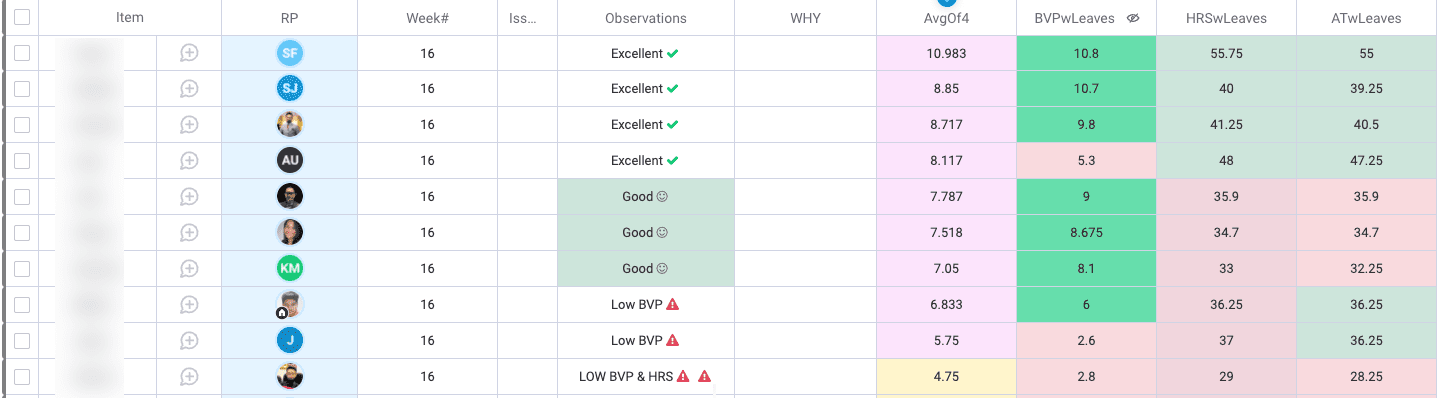
The execution of these rules are managed in a weekly report (BVP report). The report track the teams performance on the 7 Musts above rules. The report is stack ranked by the average of the rules in a weighted score.
---
**KPI**
- **HRSwLeaves**: Total # of hours worked for the week with leaves.
- **BVPwLeaves**: 1 BVP point is 4 hours of work for a completed result that pushed your key milestone forward. The rule is all employees must have a minimum of 6 BVPs per week. Meaning 24 hours of their time must have accomplished the Goal or be in the customer's hands.
- **ATwLeaves**: Tracked time verification. To you make sure your time tracking is accurate.
---
**Example BVP Report**
## Summary
---
**By following this process, your team will be able to:**
- know everyone's schedule
- track time off
- track time
- do capacity planning
- ensure everyone is working towards the main company milestone
- make it easy for everyone to work together during working hours
- track the entire team's performance in a weekly review
Also if you are interested in Automating your Accounting as well? Check out [Autymate](http://autymate.com/). Autymate Transactions for QuickBooks Online is the easiest way to get data in and out of QuickBooks -> [Learn more](http://autymate.com/amt).
 Sign in with Wallet
Connect another wallet
Sign in with Wallet
Connect another wallet