# 🌸**𝐒𝐚𝐤𝐮𝐫𝐚 𝐏𝐫𝐨𝐱𝐲 𝐆𝐮𝐢𝐝𝐞**🌸
**The guide is written for Janitor, but all proxies can be used for sites where proxies are supported (Chub, Sauspaun,Silly Tavern and etc)**

## ⛩️ [ ***Material Authors*** ] ⛩️
🌸 *Before the guide begins, let's say thank you to all the people who helped the community find proxies. The best way to thank the authors is to support them!* 🌸
*These people have nothing to do with this guide. I just took materials from their channels. If something is wrong, blame [Ejenenek](https://janitorai.com/profiles/8ed821cf-7c79-4496-9394-ae956cd72fbe_profile-of-ejenenek)* <-
---
🎋 **Special Thanks & Sources**
* ✨ **A huge thank you for the materials to:** [**iigrrd** (Telegram)](https://t.me/iigrrd) // [**Janitor Profile**](https://janitorai.com/profiles/e80bc2de-8e13-406b-9de7-3b09076cb294_profile-of-iigrrd)
* 💝 **Warmest thanks for your help:** **Dillen**
[[ Janitor ]](https://janitorai.com/profiles/3978d4e3-bfd6-419a-a88a-b6336357cf5e_profile-of-dillen) // [[ Saucepan ]](https://saucepan.ai/u/Dillen)
**📚 Other Materials used:**
* 💮 [**Unknown_Nanachi**] [Janitor Ai]( https://janitorai.com/profiles/521244d9-de98-4215-bc65-a8d911dda1ce_profile-of-unknown-nanachi)
* 💮 [AI and Drama](https://t.me/AIandDrama) | [Trigger Tourist](https://t.me/Trigger_Tourist)
* 💮 **Eva & Allora:** [TG](https://t.me/evaandallora) | [Janitor](https://janitorai.com/profiles/a580a42e-ab10-4ee6-8ca7-2191568f2d3a_profile-of-eva-porsche)
* 💮 **Honeydew:** [TG](https://t.me/honeydew_ew) | [Janitor](https://janitorai.com/profiles/b2ec0321-8b8d-48e9-87e5-32b2d4bbdf73_profile-of-honeyd-ew)
* 💮 **finhead94** [Janitor Ai](https://janitorai.com/profiles/c83f4b3b-8823-40e2-ab32-3383e167f24f_profile-of-finhead-94)
* 💮 **Dartjuk** [Janitor Ai](https://janitorai.com/profiles/0e5a58ab-e0f7-40c3-b4a3-0eb10f29aac7_profile-of-dartjuk)
---

# 🏮 **IMPORTANT NOTICE** 🏮
*Think twice before using any proxy (whether it's paid or free).*
***DO NOT rush to buy a proxy, ESPECIALLY if it just recently appeared.***
> **There are a number of dangers when using a proxy:**
> 1. 🎏 **Your logs** (chats) can be and **likely are being read**.
> 2. 🀄 When purchasing, they may **steal your data** (card details).
> 3. 🍙 Proxy may use **stolen keys**, leading to an account ban.
> 4. 🏯 **Your data** (IP, location, chats) may be leaked for shady purposes.
---
# 🎋 **What to do?** 🎋
1. **Read the terms of service** (if they don't exist, reconsider using that proxy).
2. **IF YOU ARE BUYING SOMETHING, THINK 20 TIMES.**
3. **DO NOT rush** to buy a subscription from "one-day" proxies.
4. If you want to buy, look for long-standing providers or go official (**DeepSeek**).
---

---
# 🏯 What do you need to know before setting up a proxy?🏯
---
**🈷️General collection of guides** [(How to make a bot right,what is memory, promts, extensions, and a bunch of other stuff)](https://janitorai.com/characters/23d18d3d-cf16-4c6a-a7e4-47bfcc543cec_character-%D1%81%D0%B1%D0%BE%D1%80%D0%BD%D0%B8%D0%BA-%D1%81%D0%BE%D0%B2%D0%B5%D1%82%D0%BE%D0%B2-%D1%81%D0%B1%D0%BE%D1%80%D0%BD%D0%B8%D0%BA-%D1%81%D1%82%D0%B0%D1%82%D0%B5%D0%B9-%D0%B4%D0%BB%D1%8F-%D0%BD%D0%BE%D0%B2%D0%B8%D1%87%D0%BA%D0%BE%D0%B2-%D0%B8-%D1%81%D1%82%D0%B0%D1%80%D0%B8%D1%87%D0%BA%D0%BE%D0%B2-%D1%80%D1%83%D0%BA%D0%BE%D0%B2%D0%BE%D0%B4%D1%81%D1%82%D0%B2%D0%BE-%D0%BA%D0%B0%D0%BA-%D1%81%D0%BE%D0%B7%D0%B4%D0%B0%D1%82%D1%8C-%D0%B1%D0%BE%D1%82%D0%B0-%D0%BF%D0%BE%D0%BC%D0%BE%D1%89%D1%8C-%D0%BD%D0%BE%D0%B2%D0%B8%D1%87%D0%BA%D0%B0%D0%BC)
---
# 🍙Basic terms
### 1. PROXY
A "bridge" or intermediary server that connects JanitorAI to external AI services. It allows you to use models that are not natively hosted on the site by routing your messages through a custom URL.
### 2. PROVIDER
The service or company that hosts the AI models and gives you access to them (usually via an API key).
* Examples: OpenRouter, Chutes, or the official DeepSeek API.
### 3. MODEL
The actual "brain" or software program that generates the text. Different models have different styles, logic, and creativity levels.
* Examples: DeepSeek-V3 (smooth/creative), DeepSeek-R1 (logical/reasoning), or JLLM (default).
---
## 🀄Where can I find a proxy? Where do I find one?
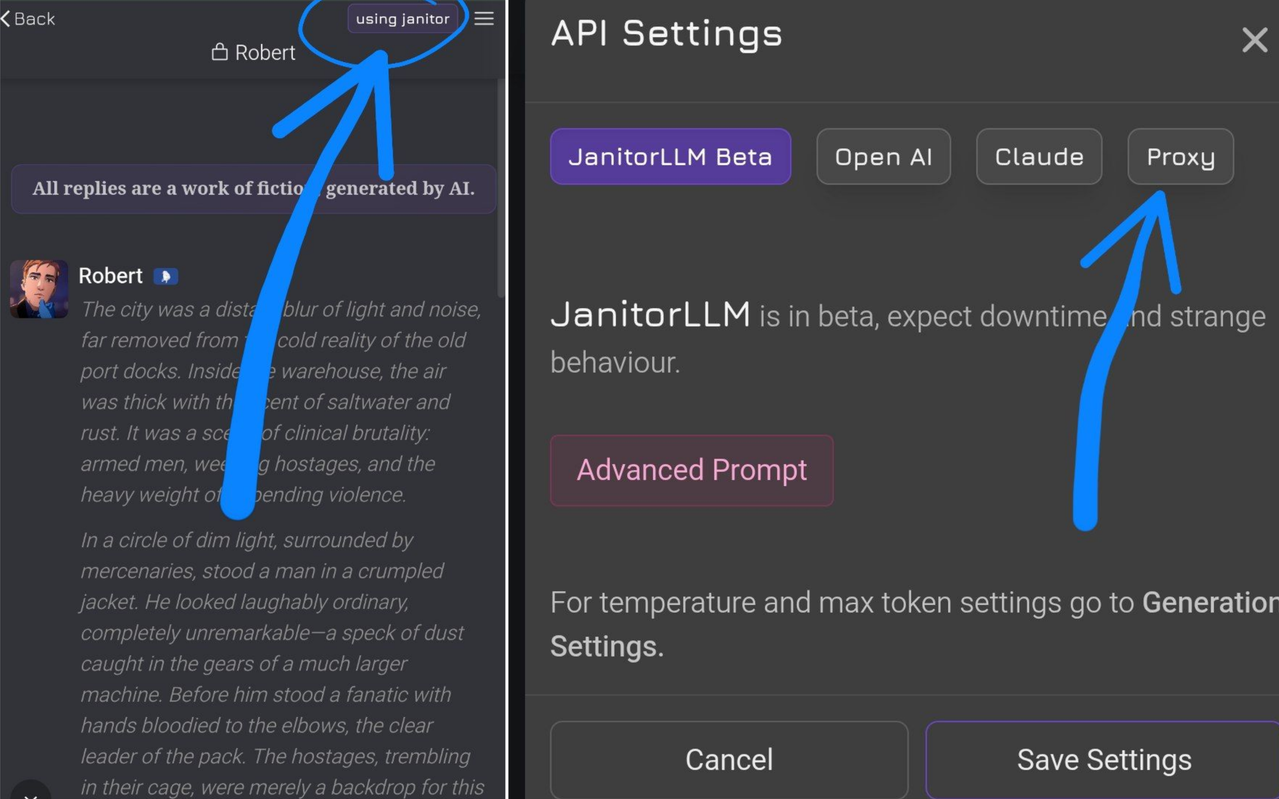
> 1. Go to any bot chat
>2. Click on the purple box in the corner **using proxy** or **using Janitor**
>3. Chose **Proxy**
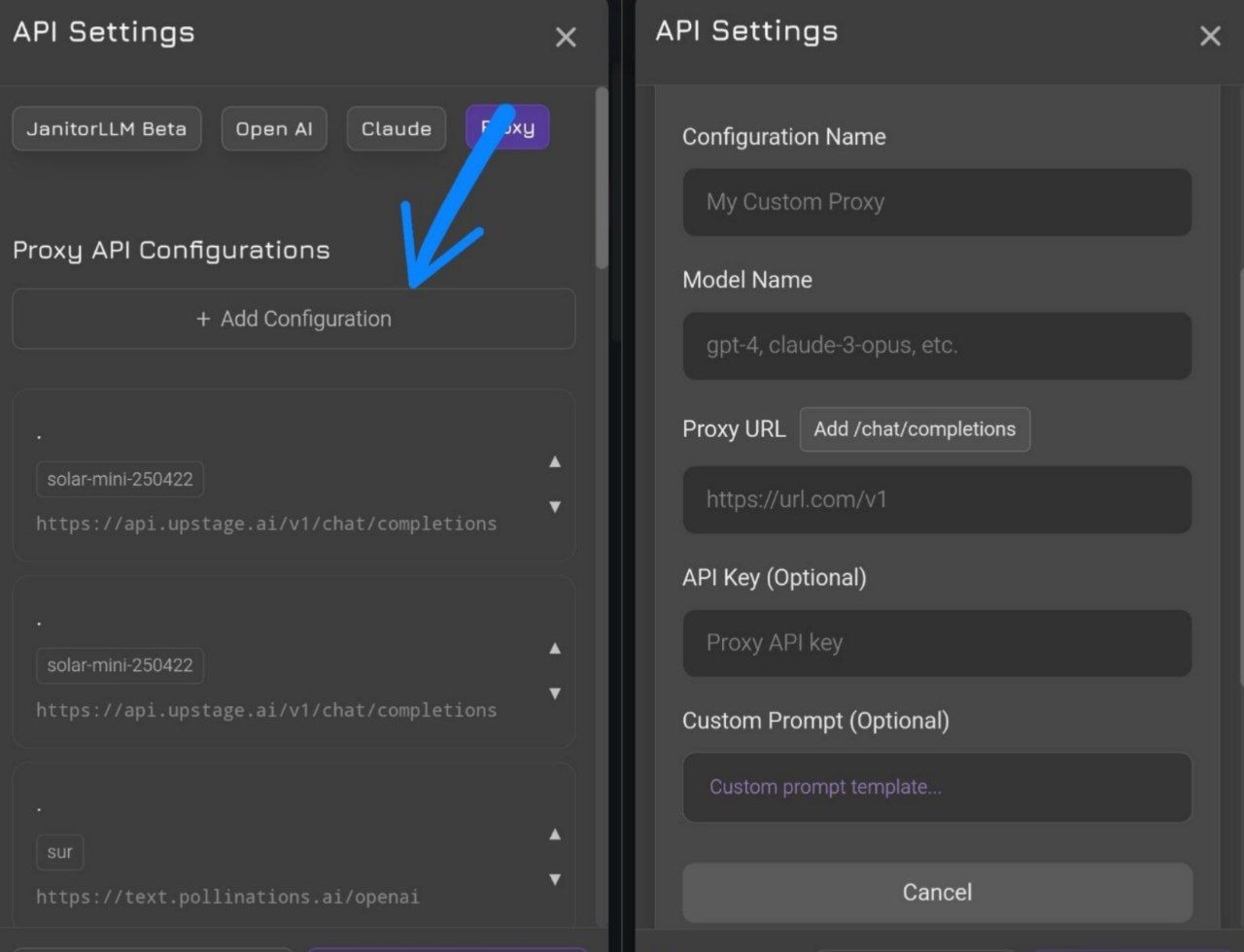
>4. Creaty **New Configuration**
>5. Fill in in accordance with the instructions
---
## 🍶 Optimized RP Settings
For a better roleplay experience, you can slightly tweak these settings:
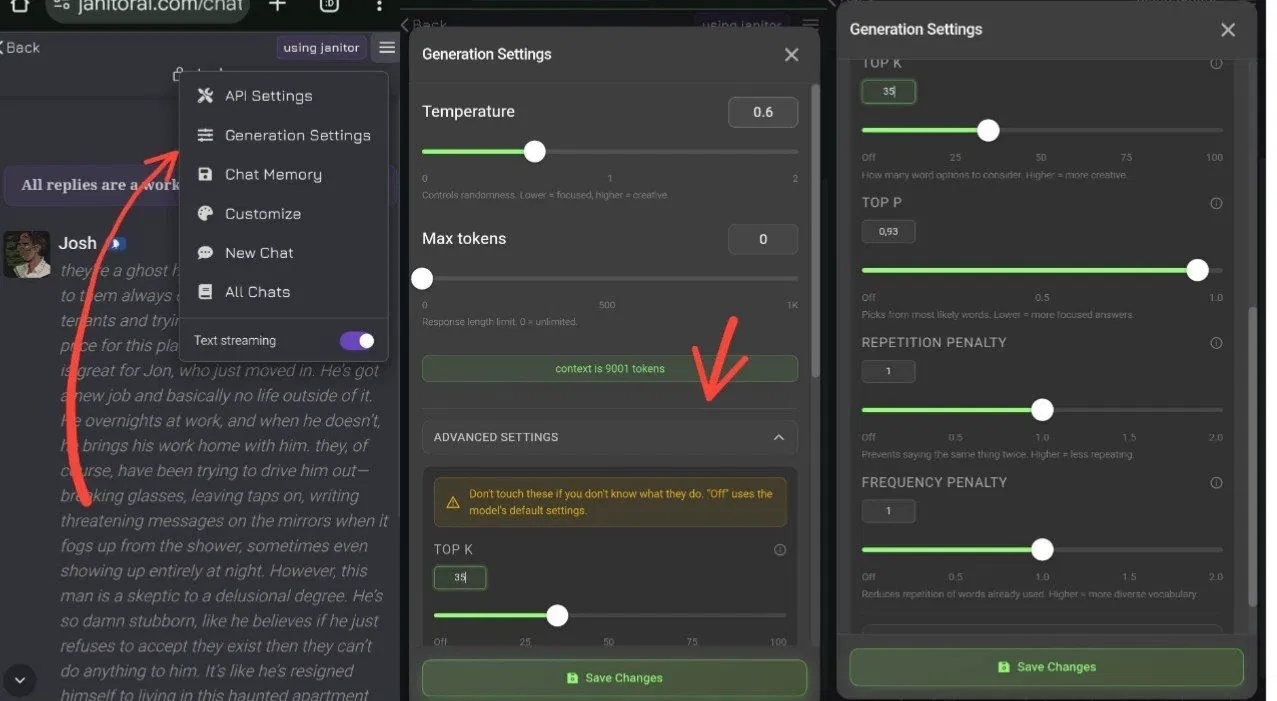
### 1. Basic Settings
* **Temperature:** **0.6 – 0.8**. If you set it to 1.0 or higher, the bot tends to "go crazy" and lose coherence.
* **Tokens:** **0**. Setting this to 0 (unlimited/max) ensures the bot finishes its sentences instead of cutting off mid-reply.
* **Context Size:** Leave as is (default). Usually around **40k** memory tokens.
---
### 2. Advanced Controls
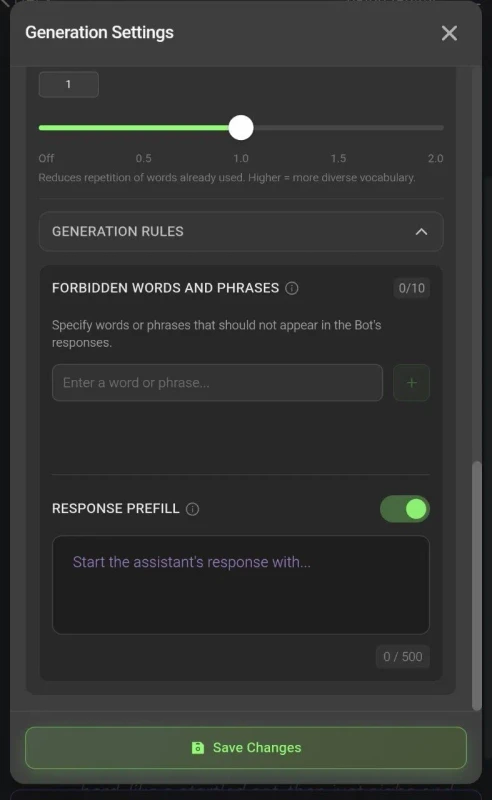
* **Banned Words (Banned Tokens):** Add repetitive or annoying words here (e.g., "my," "grabbed your wrist," etc.). Once added, the bot will stop using these specific phrases in the RP.
* **[ Prefill]:** This is "forced" information. It is the first thing the bot reads and what it will prioritize 100%. Use this to mandate specific behaviors (e.g., forcing NSFW content or adding info-boards if the bot was previously refusing).
* **[ Prompt ]:** The primary instructions for the bot on *how* to write (style, tone, and formatting rules).
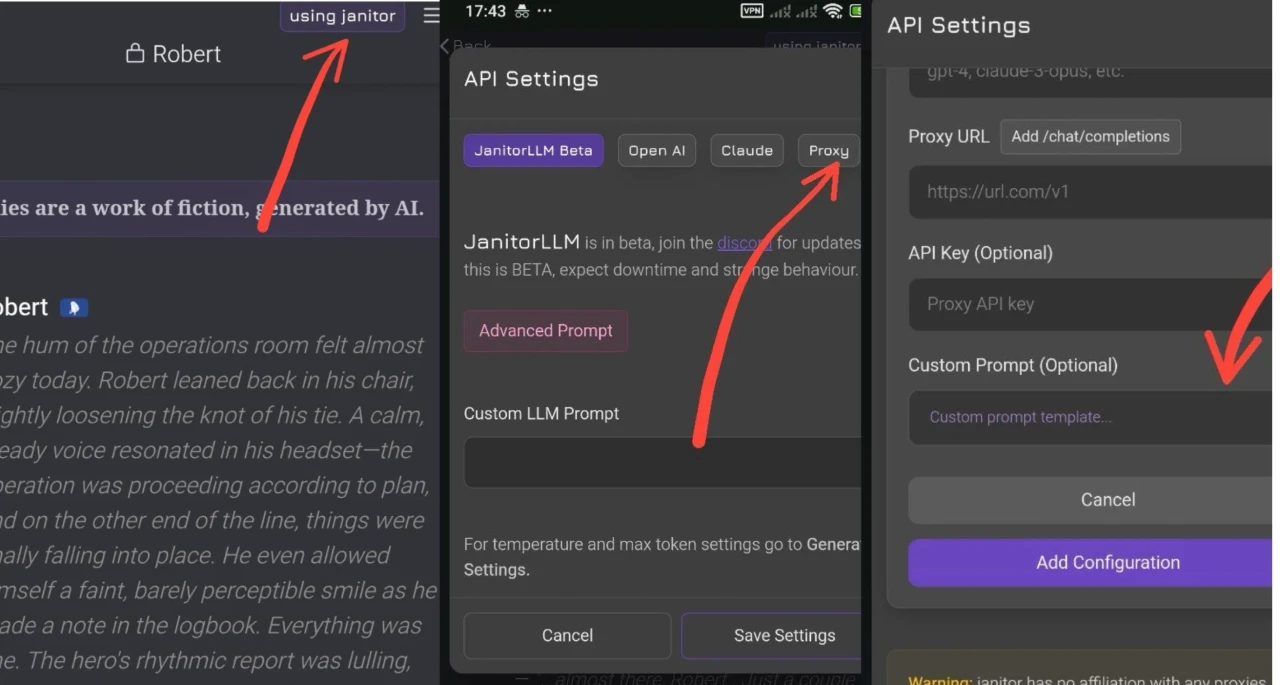
**For Proxy**
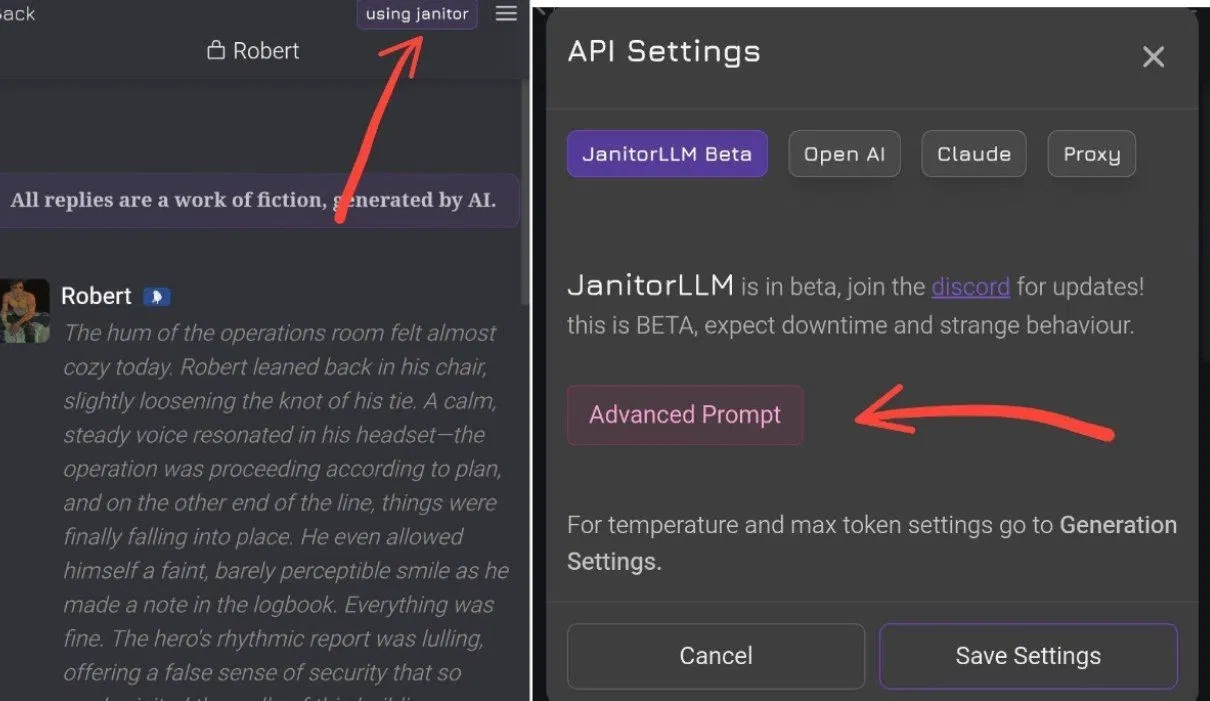
**For LLM**
---
**Where to look for prompts?**
[**My Collection**](https://janitorai.com/characters/a6d9aa74-32d0-4929-98ac-d2572107af28_character-a-collection-of-various-promts-for-any-models)| [**Janitor AI Discord**](https://discord.gg/janitorai)
---

### 🌸PROXY CONNECTION GUIDE!
> *A complete guide to connecting Free Proxies for your roleplay experience.*
---
### 🗻 OpenRouter
Register: [OpenRouter.ai](https://openrouter.ai/)
Copy your API KEY from the **Keys** section.
Choose your model: Look for the `:free` tag (50 messages/day).
Setup in JanitorAI: **Bot** -> **Proxy** (top right corner) -> **Create New Configuration**.
> **Configuration Name:** `Any name`
> **Model:** `Choose from the list below`
> **URL:** `https://openrouter.ai/api/v1/chat/completions`
> **API KEY:** `[Your copied key]`
---
### 🌸 Several Models
Paste these into the **Model** field (URL stays the same):
* 🌸 `tngtech/deepseek-r1t2-chimera:free`
* 🌸 `moonshotai/kimi-k2:free`
* 🌸 `deepseek/deepseek-r1-0528:free`
---
### 🌊 LLM7
1. **Register:** [token.llm7.io](https://token.llm7.io/)
2. **Copy your API KEY.**
3. **Choose your model:** [llm7.io](https://llm7.io/)
4. **Setup in JanitorAI:** Bot - Proxy (top right corner) - Create New Configuration.
* **Configuration Name:** Any name.
* **Model:** Your
* **URL:** `https://api.llm7.io/v1/chat/completions`
* **API KEY:** Your copied key.
#### 🌸 Several Models:
*Paste these into the Model field (URL stays the same):*
(Just a few models, see the rest on the website. They are constantly changing.)
• `deepseek-v3-0324`
• `deepseek-r1-0528`
• `mistral-small-3.1-24b-instruct-2503`
• `gpt-4.1-nano-2025-04-14`
[🎥 Video Guide](https://www.tiktok.com/t/ZT6jXqjky/)
---
### 🌌 NEBULA
1. **Register:** [nebulablock.com](https://www.nebulablock.com/)
2. **Copy API Key:** [From here](https://www.nebulablock.com/apiKeys)
3. **Setup in JanitorAI:** Bot - Proxy - Create New Configuration.
* **Model:** `deepseek-ai/DeepSeek-R1-0528-Free`
* **URL:** `https://inference.nebulablock.com/v1/chat/completions`
* **API KEY:** Your copied key.
> ⚠️ **IMPORTANT:** To use DeepSeek on Nebula, you must **link a card**. No charges will be made. Other models work **without a card**. This is due to high demand on DeepSeek.
#### 🌸 Several Models:
*Paste these into the Model field (URL stays the same):*
(Just a few models, see the rest on the website. They are constantly changing.)
* ` deepseek-ai/DeepSeek-R1`
* ` deepseek-ai/DeepSeek-V3-0324`
* `deepseek-ai/DeepSeek-R1-0528`
* ` deepseek-ai/DeepSeek-R1-Free`
* ` deepseek-ai/DeepSeek-V3-0324-Free`
[🎥 Video Guide](https://www.tiktok.com/t/ZT6jXRSh7/)
---
### 🌿 SILICONE FLOW
1. **Register:** [siliconflow.com](https://www.siliconflow.com/)
2. **Copy API Key.**
3. **Setup in JanitorAI:** Bot -Proxy - Create New Configuration.
* **Model:** `deepseek-ai/DeepSeek-R1`
* **URL:** `https://api.ap.siliconflow.com/v1/chat/completions`
* **API KEY:** Your copied key.
#### 🌸 Several Models:
(Just a few models, see the rest on the website. They are constantly changing.)
*Paste these into the Model field (URL stays the same):*
* `deepseek-ai/DeepSeek-R1`
* `deepseek-ai/DeepSeek-V3`
* `moonshotai/Kimi-K2-Instruct`
* `Qwen/Qwen3-32B`
* `MiniMaxAI/MiniMax-M1-80k`
[🎥 Video Guide](https://www.tiktok.com/t/ZT6j9RNM5/)
---
### 🏮 GMICLOUD
1. **Register:** [gmicloud.ai](https://www.gmicloud.ai/)
2. **Create & Copy API Key:** [Go here](https://console.gmicloud.ai/user-setting/organization/api-key-management)
3. **Choose Model:** You can find models in the [LLM tab](https://console.gmicloud.ai/?group=LLM).
4. **Setup in JanitorAI:** Bot Chat - Purple Proxy Button - Proxy - Create New Configuration - Save.
5. **Fill as follows:**
* **Model:** Your chosen model (e.g., `deepseek-ai/DeepSeek-R1-0528`)
* **URL:** `https://api.gmi-serving.com/v1/chat/completions`
* **API KEY:** Your copied key.
#### 🍡 Free Models:
*(Just a few models, see the rest on the website. They are constantly changing.)*
*Paste these into the Model field (URL stays the same):*
* `deepseek-ai/DeepSeek-R1-0528`
* `meta-llama/Llama-3.3-70B-Instruct`
* `Qwen/Qwen3-32B-FP8`
* `moonshotai Kimi-K2-Instruct`
[🎥 Video Guide](https://www.tiktok.com/)
---
### 🌿 NOVITA
1. **Register:** [novita.ai](https://novita.ai)
2. **Get API Key:** [Go here](https://novita.ai/settings/key-management)
3. **Choose Model:** Scroll to the bottom and copy from [here](https://novita.ai/docs/guides/llm-reasoning).
4. **Setup in JanitorAI:** Bot Chat - Purple Proxy Button - Proxy - Create New Configuration - Save.
5. **Fill details:**
* **Configuration Name:** Any name you like.
* **Model:** Your chosen model (e.g., `deepseek/deepseek-r1-distill-qwen-32b`)
* **URL:** `https://api.novita.ai/v3/openai/chat/completions`
* **API Key:** Paste your copied key.
#### 🌸 Free Models:
*(Just a few models, see the rest on the website. They are constantly changing.)*
*Paste these into the Model field (URL stays the same):*
* `deepseek/deepseek-r1-turbo`
* `deepseek/deepseek-r1-distill-qwen-32b`
* `qwen/qwen3-235b-a22b-fp8`
* `meta-llama/llama-4-maverick-17b-128e-instruct-fp8`
---
### 🏮 AIRFORCE
1. **Register:** [panel.api.airforce/signup](https://panel.api.airforce/signup/)
2. **Create & Copy API Key.**
3. **Choose Model:** Click on the `=` icon to browse.
4. **Setup in JanitorAI:** Bot Chat - Purple Proxy Button - Proxy - Create New Configuration - Save.
5. **Fill as follows:**
* **Model:** Your chosen model name.
* **URL:** `https://api.airforce/v1/chat/completions`
* **API KEY:** Your copied key.
#### 🍡 Free Models:
*(Just a few models, see the rest on the website. They are constantly changing.)*
*Paste these into the Model field (URL stays the same):*
* `deepseek-terminus`
* `deepseek-v3.2-thinking`
* `claude-sonnet-4.5`
* `llama-4-scout`
---
### 🎐 ROUT.MY
1. **Register:** [rout.my](http://rout.my)
2. **Discord Setup:** Click **Dashboard** and join their Discord.
3. **Get Key:** In Discord, go to the `#My key` channel to generate your API key (requires email).
4. **Choose Model:** Go to `#models`, click the button, and select **Free**. Copy the model name.
5. **Setup in JanitorAI:** Bot Chat - Purple Proxy Button - Proxy - Create New Configuration - Save.
* **Model:** Your chosen model.
* **URL:** `https://api.rout.my/v1/chat/completions`
* **API KEY:** Your copied key.
#### 📜 Free Models:
*(Just a few models, see the rest on the website. They are constantly changing.)*
*Paste these into the Model field (URL stays the same):*
* `anthropic/claude-haiku-4.5`
* `openai/gpt-5`
* `google/gemini-2.5-pro`
* `deepseek/deepseek-v3.2-exp`
[🎥 Video Guide](https://www.tiktok.com/)
---
### 🌊 NAGA.AC
1. **Register:** [naga.ac](http://naga.ac)
2. **Copy API Key:** [Go here](https://naga.ac/dashboard/api-keys)
3. **Choose Model:** Look for models with the **Free** tag [here](https://naga.ac/models).
4. **Setup in JanitorAI:** Bot Chat - Purple Proxy Button - Proxy - Create New Configuration - Save.
* **Model:** Your chosen model.
* **URL:** `https://api.naga.ac/v1/chat/completions`
* **API KEY:** Your copied key.
#### 🐚 Free Models:
*(Just a few models, see the rest on the website. They are constantly changing.)*
*Paste these into the Model field (URL stays the same):*
* `llama-4-scout-17b-16e-instruct:free`
* `gpt-4o-2024-11-20:free`
* `claude-3.5-haiku-20241022:free`
* `deepseek-v3.2-exp:free`
---
### 🌌 LITEROUTER
1. **Register:** [literouter.com](https://literouter.com/)
2. **Copy API Key:** [Go here](https://literouter.com/api_dashboard.php)
3. **Choose Model:** Look for the **Free** tag [here](https://literouter.com/api_dashboard_models.php).
4. **Setup in JanitorAI:** Bot Chat - Purple Proxy Button - Proxy - Create New Configuration - Save.
* **Model:** Your chosen model.
* **URL:** `https://api.literouter.com/v1/chat/completions`
* **API KEY:** Your copied key.
#### 🎋 Free Models:
*(Just a few models, see the rest on the website. They are constantly changing.)*
*Paste these into the Model field (URL stays the same):*
* `deepseek-free`
* `gemini-free`
* `gpt-oss-120b-free`
* `mistral-small-free`
---
### 🌿 N1N
1. **Register:** [api.n1n.ai](https://api.n1n.ai)
2. **Copy API Key:** Click the "two pages" icon [here](https://api.n1n.ai/console/token).
3. **Choose Model:** [Go here](https://api.n1n.ai/console/personal).
4. **Setup in JanitorAI:** Bot Chat - Proxy - Create New Configuration - Save.
* **Model:** Your chosen model.
* **URL:** `https://api.n1n.ai/v1/chat/completions`
* **API KEY:** Your copied key.
#### 🍃 Free Models:
*(Just a few models, see the rest on the website. They are constantly changing.)*
*Paste these into the Model field (URL stays the same):*
* `claude-3-7-sonnet-latest`
* `deepseek-v3.2-thinking`
* `gemini-pro-latest-thinking`
* `claude-opus-4-5-20251101`
---
# ⛩️PROVIDERS WITHOUT DEEPSEEK
---
### 🌊 INFERENCE
1. **Register:** [inference.net](https://inference.net)
2. **Choose Model:** Select one from the list or copy from below.
3. **Get Key:** Click on `=` - then click on **API KEY**.
4. **Setup in JanitorAI:** Bot Chat - Purple Proxy Button - Proxy - Create New Configuration - Save.
5. **Fill as follows:**
* **Model:** Your chosen model (e.g., `mistralai/mistral-nemo-12b-instruct/fp-8`)
* **URL:** `https://api.inference.net/v1/chat/completions`
* **API KEY:** Your copied key.
#### 🍡 Free Models:
*(Just a few models, see the rest on the website. They are constantly changing.)*
*Paste these into the Model field (URL stays the same):*
* `google/gemma-3-27b-instruct/bf-16`
* `meta-llama/llama-3.2-11b-instruct/fp-16`
* `mistralai/mistral-nemo-12b-instruct/fp-8`
---
### 🎐 UPSTAGE
1. **Register:** [console.upstage.ai](https://console.upstage.ai/api-keys?api=chat)
2. **Copy API KEY** from the dashboard.
3. **Setup in JanitorAI:** Bot Chat - Purple Proxy Button - Proxy - Create New Configuration.
4. **Fill details:**
* **Model:** e.g., `solar-pro2-250710`
* **URL:** `https://api.upstage.ai/v1/chat/completions`
* **API KEY:** Your copied key.
#### 📜 Free Models:
*(Just a few models, see the rest on the website. They are constantly changing.)*
*Paste these into the Model field (URL stays the same):*
* `solar-mini-250422`
* `solar-pro-250422`
* `solar-pro2-250710`
---
### 🍃 MISTRAL
1. **Register:** [console.mistral.ai/upgrade/plans](https://console.mistral.ai/upgrade/plans)
2. **Plan:** Click on the **"Experiment"** tier.
3. **Copy Key:** Create and copy your key from the dashboard.
4. **Setup in JanitorAI:** Bot Chat - Proxy.
5. **Fill as follows:**
* **Model:** `mistral-medium-2505`
* **URL:** `https://api.mistral.ai/v1/chat/completions`
* **API Key:** Your copied key.
---
### 🎋 ARLIAI
1. **Register:** [arliai.com](https://www.arliai.com)
2. **Copy Key:** Create and copy your API key.
3. **Setup:**
* **Model:** `Gemma-3-27B-ArliAI-RPMax-v3`
* **URL:** `https://api.arliai.com/v1/chat/completions`
* **API Key:** Your copied key.
---
### 🕯️ PERPLEXITY LABS
1. **Register:** [labs.perplexity.ai](https://labs.perplexity.ai)
2. **Get Key:** Obtain the API key in Account Settings.
3. **Setup:**
* **Model:** `llama-3-70b-instruct`
* **URL:** `https://api.perplexity.ai/chat/completions`
* **API Key:** Your key.
---
### 🌪️ GROQ
1. **Register:** [console.groq.com](https://console.groq.com)
2. **Get Key:** Create key in the **API Keys** section.
3. **Setup:**
* **Model:** `llama3-70b-8192`
* **URL:** `https://api.groq.com/openai/v1/chat/completions`
* **API Key:** Your key.
---
### 🌑 DEEPINFRA
1. **Register:** [deepinfra.com](https://deepinfra.com)
2. **Get Key:** Dashboard - API Keys.
3. **Setup:**
* **Model:** `meta-llama/Llama-3-70b-instruct`
* **URL:** `https://api.deepinfra.com/v1/openai/chat/completions`
* **API Key:** Your key.
---
### 🔍 JINA
1. **Register:** [jina.ai](https://jina.ai/)
2. **Copy Key** from your dashboard.
3. **Setup:**
* **Model:** `reader-lm-1.5b`
* **URL:** `https://deepsearch.jina.ai/v1/chat/completions`
* **API Key:** Your copied key.
---
## 👘 CEREBRAS
1. **Register:** [cloud.cerebras.ai](https://cloud.cerebras.ai/)
2. **Get Key:** [API Keys Section](https://cloud.cerebras.ai/platform/org_xvdv6k8tv29mkytej4j4pp33/apikeys)
3. **Choose Model:** Select one from the list below.
4. **Setup in JanitorAI:** Bot Chat — Purple Proxy Button — Proxy — Create New Configuration — Save.
5. **Fill as follows:**
* **Model:** Your chosen model (e.g., `llama-3.3-70b`)
* **URL:** `https://api.cerebras.ai/v1/chat/completions`
* **API KEY:** Your copied key.
#### 🌸 High-Speed Models:
*(Full list: [Cerebras Docs](https://inference-docs.cerebras.ai/models/overview))*
*Paste these into the Model field:*
* `llama-3.3-70b`
* `llama3.1-8b`
* `qwen-3-32b`
* `qwen-3-235b-a22b-instruct-2507`
* `gpt-oss-120b`
* `zai-glm-4.7`
---
# 🌸CONNECTING GEMINI
(only official methods)
---
## 🩷 Google AI Studio
1. ✨ **Generate API key:** [**[Get your key here]**](https://aistudio.google.com/app/api-keys)
2. ✨ **Open Janitor** → Select your Bot → **Proxy** (top right corner).
3. ✨ **Fill in the details:**
> **Model:** `[Your model name]`
> **URL:** `https://generativelanguage.googleapis.com/v1beta/chat/completions`
> **API KEY:** `[Your copied key]`
[📋 Model Names](https://ai.google.dev/gemini-api/docs/models?hl=en#gemini-2.5-pro) | [📊 Quota Limits](https://console.cloud.google.com/apis/api/generativelanguage.googleapis.com/quotas?hl=en)
> 💡 Look for **"per quota free tier"**. Currently, they provide up to 20 messages per day.
**Free Tier Models:**
`gemini-2.5-flash-lite` | `gemini-3-flash-preview`
---
## 🐍 Personal URL Method (Colab)
> ⚠️ **Important:** VPN is required! Limits reset at 10:00 AM MSK.
1. 🌸 Create a Google account.
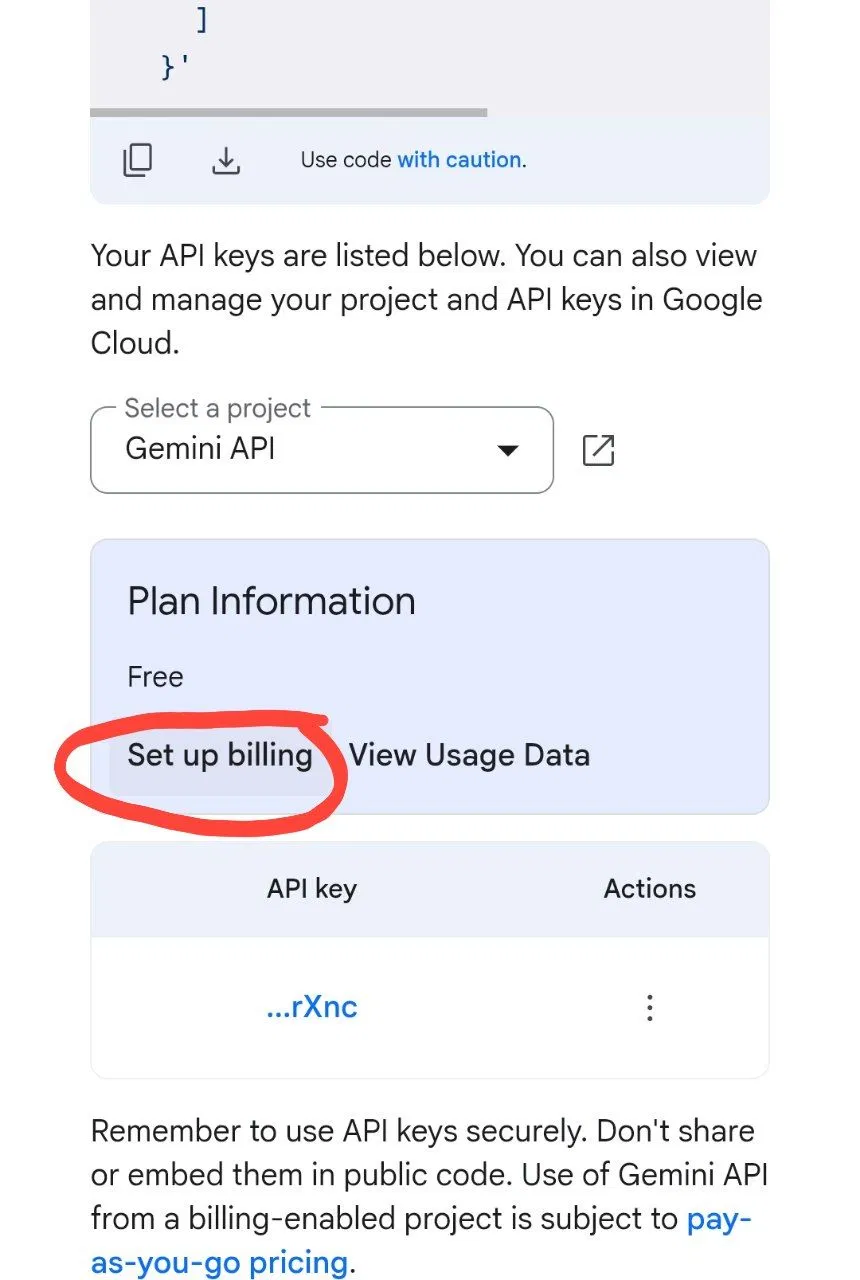
2. 🌸 Copy your API KEY: [[Link]](https://aistudio.google.com/apikey). Click "Set billed" (you can enter random data).
3. 🌸 Go to Google Colab: [[Open Script]](https://colab.research.google.com/drive/1xlqI0LeZLfbJRHOE92NrXbSVR1-SvQ7X)
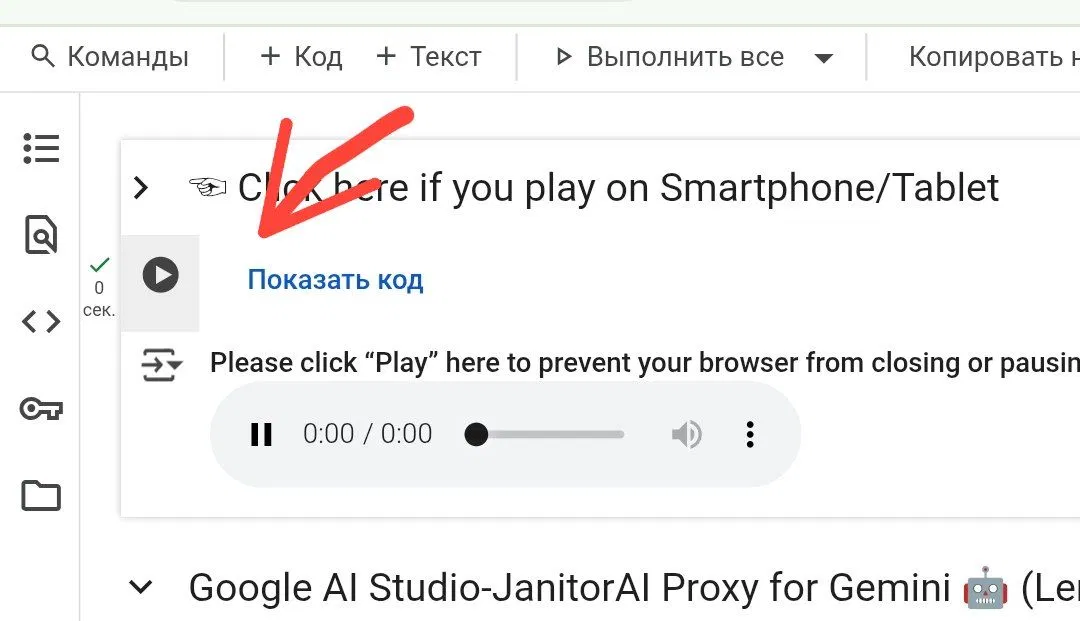
Look for the ▶️ button and press it. Select the **Gemini** model.
### ⚙️ "Thinking" Configuration
*Determines if the bot "thinks" before answering (affects quality):*
* **Enable_thinking** * *Toggle ON* → OFF (Faster)
* *Toggle OFF* → ON (Higher quality)
* **Display_thinking** * Show bot's thoughts in chat? (ON - No / OFF - Yes)
**My Recommended Settings:**
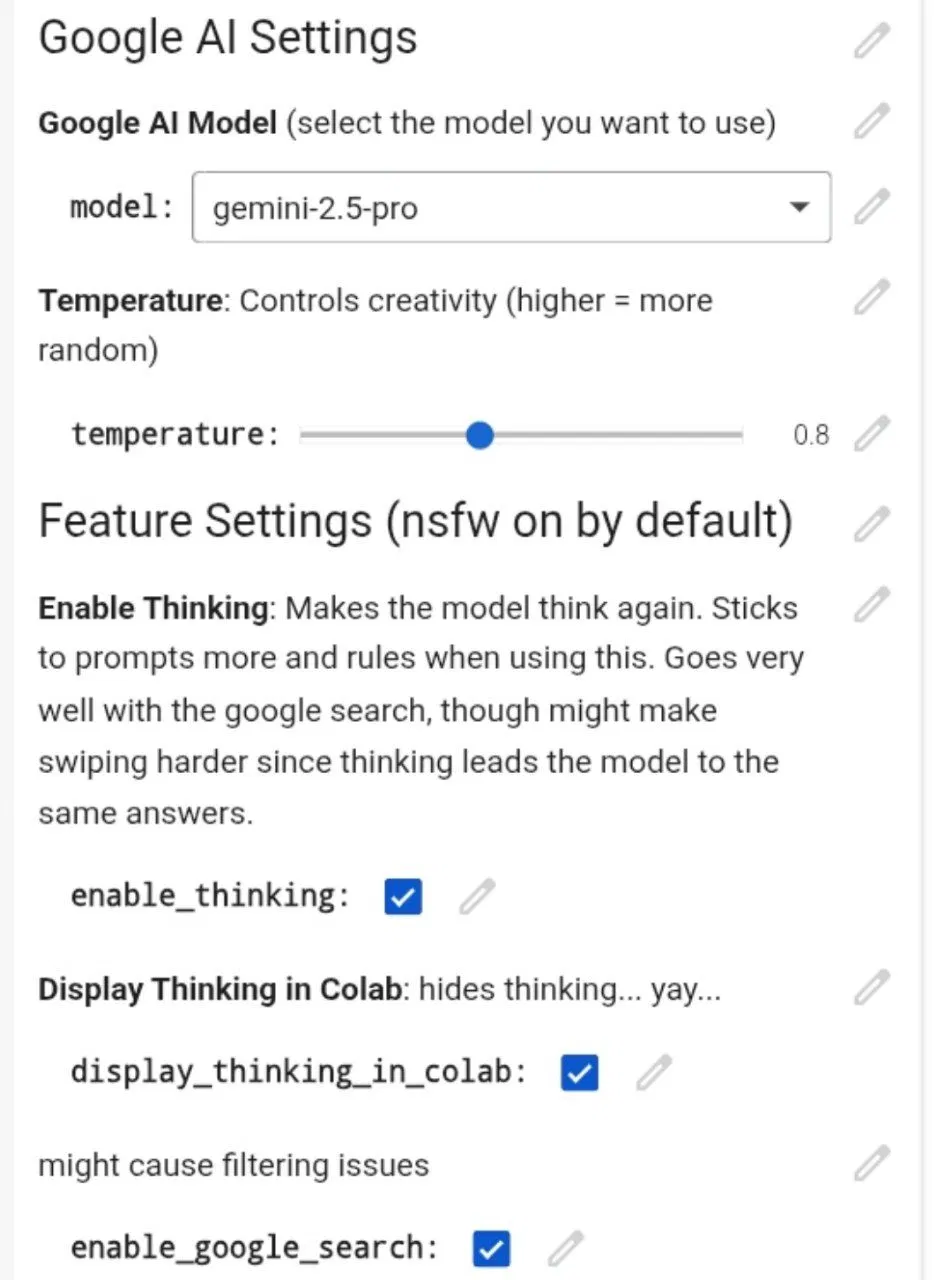
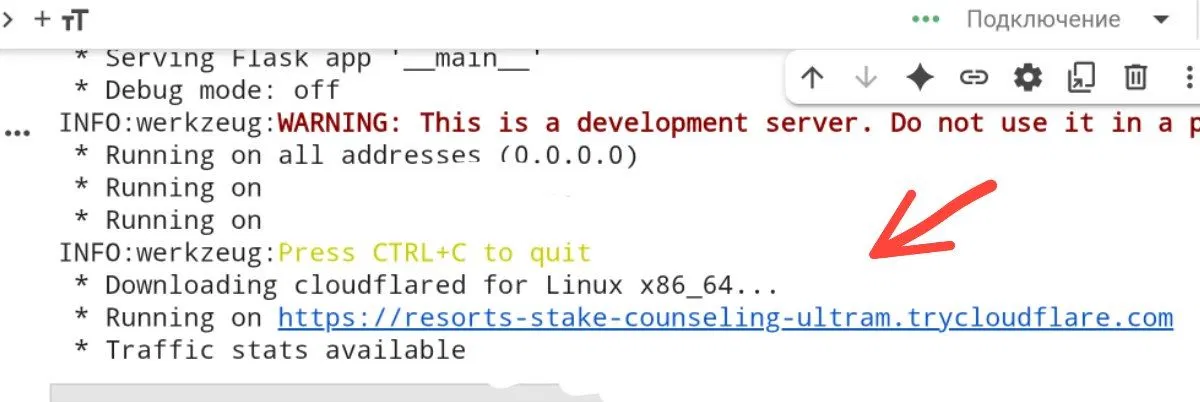
Press ▶️, wait 1-3 minutes, and look for the link **"Running on..."** in the logs.
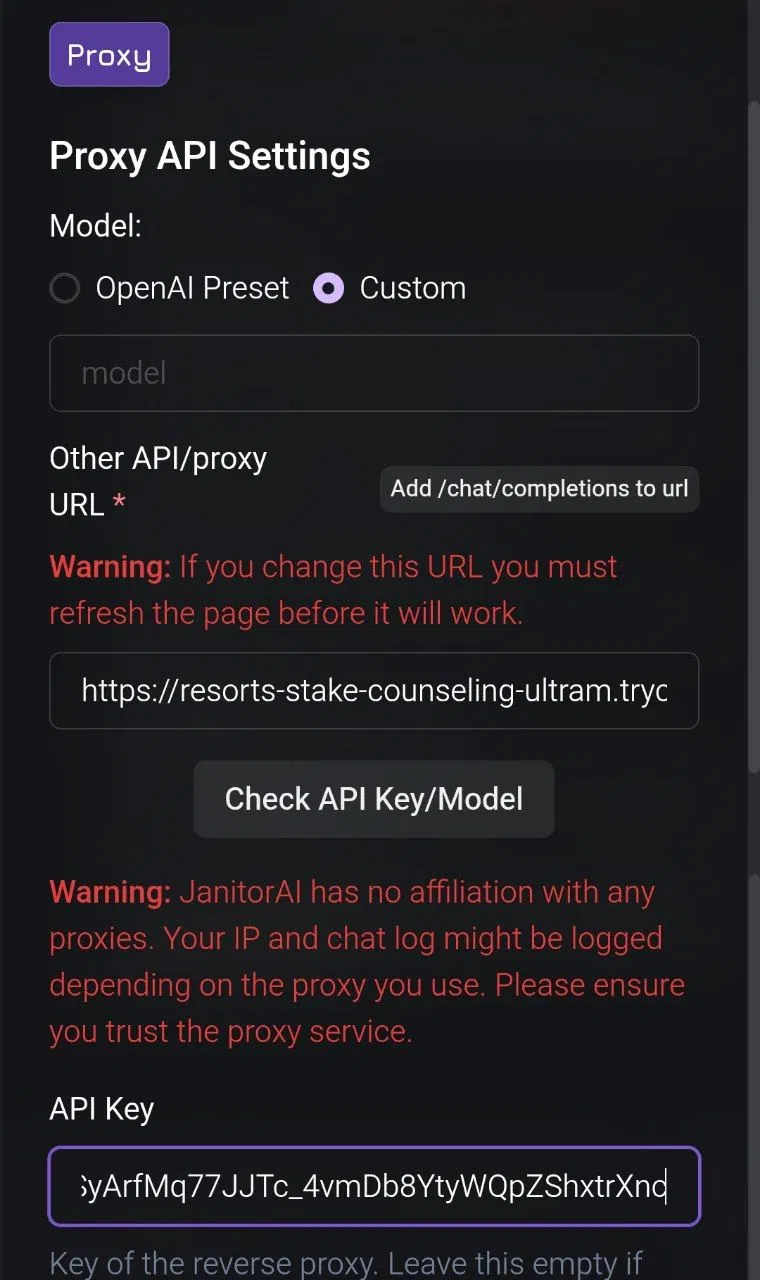
**Final Janitor Setup:**
* **Model name:** leave empty
* **URL:** link from Colab (Cloud)
* **API:** Your Gemini API key
---
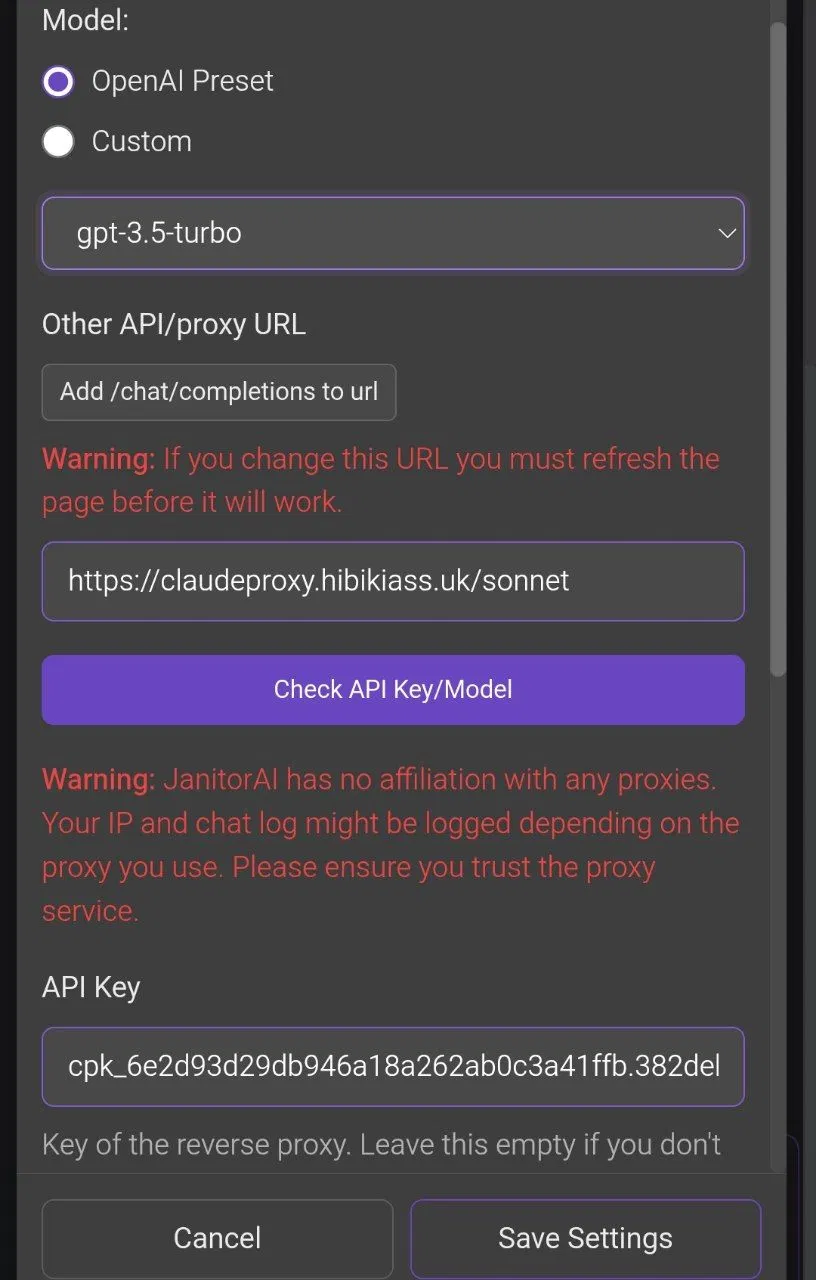
## ☁️ CLOUD Setup (Anthropic)
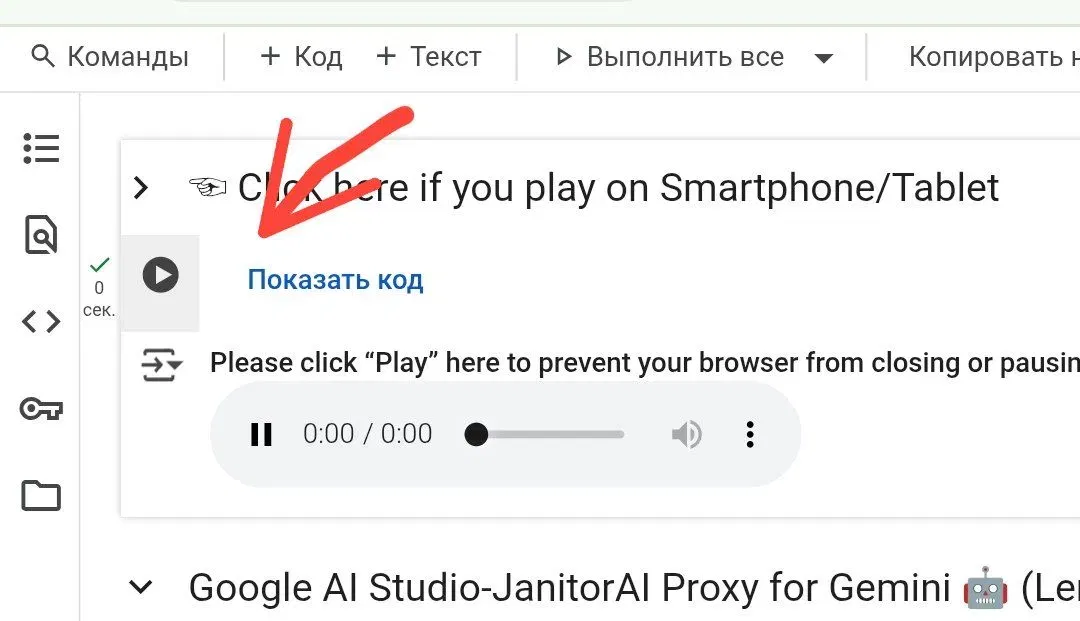
1. ✨ Open Colab: [[Open]](https://colab.research.google.com/drive/1OYj_IUCu5Wc8T3Wtxnf0iRul17CPEF4K)
2. ✨ Select the model and press ▶️
3. 
4. ✨ Scroll down the log and find **"Running on: [link]"**.
5. ✨ Register Anthropic API: [[Here]](https://console.anthropic.com/settings/keys)
**Janitor Proxy Settings:**
> **Model:** The one you selected
> **URL:** Cloud link from Colab
> **API Key:** Key from your Anthropic dashboard
*Example of a finished setup:*
---
# 🌸 Gemini via Sophia (Lorebary) 🌸
---
This method uses **Sophia’s Lorebary** proxy to help bypass filters and provide a better experience for uncensored roleplay.
### 🔑 Step 1: Get Your Gemini API Key
1. ✨ **API Studio:** Go to [aistudio.google.com/apikey](https://aistudio.google.com/apikey).
2. ✨ **Create Key:** Click "Create API Key" and copy it.
3. ⚠️ **Pro Tip:** Use a "burner" Google account. While rare, using Gemini for NSFW content carries a risk of account action from Google.
---
### ⚙️ JanitorAI Configuration
Go to your **Bot** - **Proxy** (top right) -**Create New Configuration**.
> **Configuration Name:** `Gemini Sophia`
> **Model:** `Choose from list below`
> **URL:** `https://lorebary.sophiamccarty.com/aistudio`
> **API KEY:** `[Paste your Gemini API Key]`
---
### 💮 Sophia's Special Commands
To get the most out of this proxy, add these commands to the **end** of your **Custom Prompt** in API Settings:
> `<PREFILL_ON>`
> `<JAILBREAK=ON>`
> `<FORCETHINKING=ON>`
> `<AUTOPLOT=ON>`
> `<BETTERSPICE=ON>`
✨ **There may be several codes, up to 10 pieces.**
>[More codes can be found on Sophie herself](https://janitorai.com/external-link?to=https%3A%2F%2Florebary.sophiamccarty.com%2Fplugin-library)
---
### ⚠️ Troubleshooting
* ❌ **Error 500:** Internal Google error. Usually temporary—just wait a few minutes.
* ❌ **Error 429:** You have reached your daily message limit or rate limit.
* ❌ **Network Error:** Common during high traffic. Try again later or refresh.
* ❌**404 Error:** Double-check that your Proxy URL is exactly: `https://lorebary.sophiamccarty.com/aistudio`
---

## 🏮 TROUBLESHOOTING & COMMON ERRORS 🏮
---
### ⚠️ Network Error - Try Again
This occurs during server overload or unstable internet connection.
**What to do:**
* Ensure your internet is working properly.
* Switch between mobile data and Wi-Fi (or vice versa).
* **Disable VPN.**
* Verify that all Proxy data (URL, Model, Key) is entered correctly.
* Wait 5–10 minutes and try again.
* If the issue persists, switch to a different model or try another proxy method.
---
### ⚠️ Bot cuts off message / Incomplete text
This is a common generation issue.
**What to do:**
* Go to Generation Settings and **Disable Text Streaming**.
* Try lowering the **Temperature** or **Top P** settings.
---
### ⚠️ Not Enough Quota
You have reached your token or message limit.
**What to do:**
* Create a new account and generate a new API Key.
* Alternatively, wait for the daily reset if the service offers daily limits (like Rout.my or OpenRouter).
---
### ⚠️ Rate Limited / Failed to Fetch
Too many requests in a short time.
**What to do:**
* Refresh the page and wait. Double-check your Proxy URL and Model Name for any hidden spaces or typos.
---
### ⚠️ PROXY ERROR 401: No auth credentials
Wrong or expired API key.
**What to do:**
* Generate a fresh API key from the provider's dashboard and replace the old one in Janitor.
---
### ⚠️ PROXY ERROR 402: Insufficient credits
Daily limit reached for the current key.
**What to do:**
* Switch to a new account or wait for the reset (usually at 00:00 UTC).
---
### ⚠️ Bot is speaking Chinese or gibberish
The model is likely "hallucinating" due to high settings.
**What to do:**
* Lower the **Temperature** (try 0.7 - 0.9) or adjust **Top P**.
---

### ‼️ Gemini Specific Errors
*If you encounter a stuck or unresponsive error with Gemini models, try these fixes:*
**⚠️The bot doesn't write,although it seems to write**
**What to do:**
* Turn on streaming
---
⚠️ **An error occurred while processing your reguest (unk)**
---
**What to do:**
1. **Switch Projects:** If you have multiple projects (and keys), simply switch to a different one in your Janitor configurations.
2. **The Penalty Trick:** Go to your Generation Settings - set **Frequency/Presence Penalty** to **1** - and spam the "Send" button multiple times. Once the bot starts responding, set the penalty back to **0** and it should be back to normal.
3. **Refresh the Key:** Generate a brand new API Key and replace the old one.
4. **Wait for Reset:** If none of the above work, you have likely reached your message limit. You will need to wait for the daily reset.
---
## ✨Feedback
Perhaps in the future this guide will be updated and some proxies will be removed. If you notice that the proxy no longer offers a free plan, please write [Google Form](https://forms.gle/ZxmATSPgwoTgy58XA)
 Sign in via Google
 Sign in via Facebook
 Sign in via X(Twitter)
 Sign in via GitHub
 Sign in via Dropbox
 Sign in with Wallet
Connect another wallet
Sign in with Wallet
Connect another wallet