# 2016q3 Homework 1 (phonebook)
contributed by <``yanzijun``>
## 作業環境
+ OS: Ubuntu 16.04.1 LTS
+ CPU: Intel(R) Core(TM) i5-3337U CPU @ 1.80GHz
+ Memory: 8G
+ cache:
+ L1d cache: 32K
+ L1i cache: 32K
+ L2 cache: 256K
+ L3 cache: 3072K
## 前置作業
因為看到 [@aweimeow](https://hackmd.io/EwFgZghgDAjA7AVgLQA44QJxJAEwMwypwxRJR4ZxgBGcsUEKQA==) 與 [@louielu](https://hackmd.io/CYJgZgHA7AnADAFgLQGMCmaCGSEGYCsyMARjPkgIwhS4gT4VwogJA===#) 共筆有使用lstopo套件,因此也決安裝一下,以便獲取更多詳細的cache資料,方便後面的分析。
### 安裝lstopo
```shell
# 參考aweimeow提供的安裝方法
$ wget https://www.open-mpi.org/software/hwloc/v1.11/downloads/hwloc-1.11.4.tar.gz
$ tar zxvf hwloc-1.11.4.tar.gz
$ cd hwloc-1.11.4
$ cat README # 不過他的 README 沒有說明要怎麼安裝 Orz
$ ./configure
$ make
$ sudo make install
```
非常順利的安裝完成了,沒有噴任何錯誤..
那就開啟lstopo吧!
因為我只要看 cache 資料,所以透過 --no-io 參數,使其不輸出I/O 裝置等資料
```shell
$ lstopo --no-io
```
輸出
```
Machine (7870MB) + Package L#0 + L3 L#0 (3072KB)
L2 L#0 (256KB) + L1d L#0 (32KB) + L1i L#0 (32KB) + Core L#0
PU L#0 (P#0)
PU L#1 (P#2)
L2 L#1 (256KB) + L1d L#1 (32KB) + L1i L#1 (32KB) + Core L#1
PU L#2 (P#1)
PU L#3 (P#3)
```
### 安裝perf
先看Kernel config 有沒有開啟 Perf , PC安裝一般 Linux distro ,預設應該有開。
```shell
$ cat "/boot/config-`uname -r`" | grep "PERF_EVENT"
```
如有開啟其值應該會是y
```shell
CONFIG_PERF_EVENTS_INTEL_UNCORE=y
CONFIG_HAVE_PERF_EVENTS=y
CONFIG_PERF_EVENTS=y
CONFIG_HAVE_PERF_EVENTS_NMI=y
```
開始安裝perf
```shell
$ sudo apt-get install linux-tools-common linux-tools-generic
```
接著輸入perf top 查看系統目前各個函式再Event上的效能
```shell
$ perf top
```
應該會出現下面這種情形
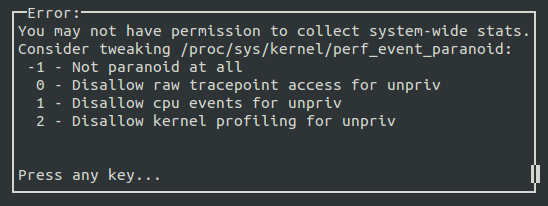
透過sudo執行,即可看到perf top的分析

但可透過kernel.perf_event_paranoid 來決定你在沒有 root 權限下 (Normal User) 使用 perf 時,你可以取得哪些 event data。預設值是 1 ,可以輸入
```shell
$ cat /proc/sys/kernel/perf_event_paranoid
```
來查看權限值。一共有四種權限值:
``2`` : 不允許任何量測。但部份用來查看或分析已存在的紀錄的指令仍可使用,如 perf ls、perf report、perf timechart、 perf trace。
``1`` : 不允許 CPU events data。但可以使用 perf stat、perf record 並取得 Kernel profiling data。
``0`` : 不允許 raw tracepoint access。但可以使用 perf stat、perf record 並取得 CPU events data。
``-1``: 權限全開。
最後如果要檢測 cache miss event ,需要先取消 kernel pointer 的禁用。
```shell
$ sudo sh -c " echo 0 > /proc/sys/kernel/kptr_restrict"
```
### 安裝 gnuplot 製圖
```shell
$ sudo apt-get install gnuplot
```
### astyle + Git 自動程式碼縮排檢查
安裝astyle
```shell
$ sudo apt-get install astyle
```
調整作業風格要求如下
```shell
$ astyle --style=kr --indent=spaces=4 --indent-switches --suffix=none *.[ch]
```
安裝 Git pre-commit hook 可在每次 git commit 時,檢查 C/C++ 原始程式碼的風格是否一致:
```shell
$ ln -sf ../../scripts/pre-commit.hook .git/hooks/pre-commit
```
## 實作 phonebook 案例
先針對未優化過版本進行 cache-miss, cache-references, instructions, cycles 執行100次的分析
```shell
perf stat --repeat 100 -e cache-misses,cache-references,instructions,cycles ./phonebook_orig
```
輸出結果
```
Performance counter stats for './phonebook_orig' (100 runs):
2,088,386 cache-misses # 95.686 % of all cache refs ( +- 0.17% )
2,182,530 cache-references ( +- 0.17% )
260,717,761 instructions # 1.44 insns per cycle ( +- 0.02% )
180,625,105 cycles ( +- 0.12% )
0.071431807 seconds time elapsed ( +- 0.90% )
```
其cach-misses 高達 95.686%
查看執行效率
```shell
$ ./phonebook_orig
```
輸出
```
size of entry : 136 bytes
execution time of append() : 0.091677 sec
execution time of findName() : 0.005124 sec
# cache-misses 95.686 %
```
### 如何優化?
+ **更改資料結構**
我們先看一下 ``phonebook_orgi.h`` 中的code
```c
/* original version */
typedef struct __PHONE_BOOK_ENTRY {
char lastName[MAX_LAST_NAME_SIZE];
char firstName[16];
char email[16];
char phone[10];
char cell[10];
char addr1[16];
char addr2[16];
char city[16];
char state[2];
char zip[5];
struct __PHONE_BOOK_ENTRY *pNext;
} entry;
```
再找電話簿資料中,一般來說我們是以找姓名或住址等一項進行索引,找到符合後才去看相關資料如:電話、住址、Email、姓名等。這裡的程是以找lastName為主,但結構中卻有一大堆其他的資料,好比資料庫搜尋姓名卻把所有欄位都列入搜尋。
因此我們先把一些資料放在另一結構中,等有需要的時候再讀取
```c
typedef struct __PHONE_BOOK_DATA {
char firstName[16];
char email[16];
char phone[10];
char cell[10];
char addr1[16];
char addr2[16];
char state[2];
char zip[5];
} data;
typedef struct __PHONE_BOOK_ENTRY {
char lastName[MAX_LAST_NAME_SIZE];
struct data *data;
struct __PHONE_BOOK_ENTRY *pNext;
} entry;
```
此處我要澄清一件事,就是我沒寫過C語言...
所以關於struct這邊的寫法是參照 [aweimeow](/s/ryCTJfIp) 的寫法,關於struct以前高中練演算法常見也知道是什麼,但畢竟對於C語言沒有開發經驗跟研讀,所以語法都是邊查邊問,如果有錯或不好之處請告知。
修改完畢後,``cache-misses``已經下降至 ``73.224%``
```
Performance counter stats for './phonebook_opt' (100 runs):
376,674 cache-misses # 73.224 % of all cache refs ( +- 0.19% )
514,414 cache-references ( +- 0.31% )
243,955,824 instructions # 1.82 insns per cycle ( +- 0.02% )
134,089,503 cycles ( +- 0.19% )
0.052669400 seconds time elapsed ( +- 1.06% )
```

```
size of entry : 32 bytes
execution time of append() : 0.096749 sec
execution time of findName() : 0.004163 sec
```
可以發現size of entry 僅剩下 ``32 bytes`` 與原先的 ``136bytes`` 差了100多 bytes, ``append`` 與 ``findName``的時間也都有下降。
L1 cache: 32K / Phonebook size: 136 Bytes => 約30筆 entry
L1 cache: 32K / Phonebook size: 32 Bytes => 約128筆 entry
能存放的筆數已經是原本約4倍,但35萬筆之料當中,其存放的量仍然相當的少,代表我們還有很大的進步空間。
+ **使用Hash Table**
- Hash方法 : BKDRHash
- Table大小 : 42737 (質數,減少碰撞)
新增``main_hash.c`` 、 ``phonebook_hash.c`` 、 ``phonebook_hash.h`` 3個檔案
修改``calculate.c`` 、 ``Makefile`` 2個檔案
+ **新增 Hash 結構 ``phonebook_hash.h``複製 ``phonebook_opt.h`` 來修改**
定義TABLE_SIZE 之後建立Hash Table大小用的到
```C
#define TABLE_SIZE 42737
```
```C
typedef struct __PHONE_BOOK_HASH{
entry **list;
} hashTable;
```
此處使用pointer to pointer 使為了串接碰撞資料(這裡有點不懂,需再提問)
**參考資料:**[TempoJiJi 學長共筆](https://hackmd.io/s/S1I5-CzT#實做hash降低findname時間)
修改函數 ``*findName`` 函數,第二個參數改用hashTable去做,而不再用``pHead``串列去找,大幅下降``findName``時間
``append`` 函數,第二個參數也是用hashTable,但回傳型態修改為void,原本會再回傳``entry``,這裡直接用HashTable,所以不用回傳。
重新宣告函數,並新增 ``createHashTable`` 與 ``hash`` 函數
```C
entry *findName(char lastName[], hashTable *tb);
void append(char lastName[], hashTable *tb);
hashTable *createHashTable(int tablesize);
unsigned int hash(char *str);
```
+ **複製 ``phonebook_opt.c`` 為 ``phonebook_hash.c`` 進行修改**
新增 hash 函數,採用``BKDR Hash`` 法
**參考資料:**[各項Hash比對](https://www.byvoid.com/zht/blog/string-hash-compare)
```C
unsigned int hash(char *str)
{
unsigned int hash_value = 0;
unsigned int seed = 131;
while(*str)
hash_value = hash_value * seed + (*str++);
return (hash_value % TABLE_SIZE);
}
```
有關為何要乘上一個seed係數
**參考資料:**[Programming Small](https://hackmd.io/EYYwTOCGDMCsC0AzSBGALPN0BsL6UQHYAOeABi0LGkmDIE5o0g==#hash-function)
新增 ``createHashTable`` 製作Hash Table
```C
hashTable *createHashTable(int tableSize){
int i;
hashTable *tb;
tb = (hashTable*)malloc(sizeof(hashTable));
tb->list = (entry **)malloc(sizeof(entry*)*tableSize);
for(i = 0;i < tableSize;i++){
tb->list[i] = NULL;
}
return tb;
}
```
重新修改 findName 方式,採用HashTable能下降速度及減少cache-miss
```C
entry *findName(char lastName[], hashTable *tb){
entry *e;
unsigned int index = hash(lastName);
for(e = tb->list[index]; e != NULL; e = e->pNext){
if (strcasecmp(lastName, e->lastName) == 0)
return e;
}
return NULL;
}
```
修改 append 方式,改用無回傳值直接併入Hash Table
```C
void append(char lastName[], hashTable *tb)
{
/* allocate memory for the new entry and put lastName */
unsigned int index = hash(lastName);
entry *e;
e = (entry*)malloc(sizeof(entry));
strcpy(e->lastName, lastName);
e->pNext = tb->list[index];
tb->list[index] = e;
}
```
+ **複製 ``main.c`` 為 ``main_hash.c``來做修改**
建立Hash Table,呼叫 ``createHashTable`` 函數
```C
hashTable *tb = createHashTable(TABLE_SIZE);
```
修改 ``append`` 方式,原本為
```C
e = append(line, e);
```
因為改用Hash Table不用回傳,修改為
```C
append(line, tb);
```
找到
```C
assert(findName(input, e) &&
"Did you implement findName() in " IMPL "?");
assert(0 == strcmp(findName(input, e)->lastName, "zyxel"));
```
將 ``findName`` 第二個參數改為Hash Table
```C
assert(findName(input, tb) &&
"Did you implement findName() in " IMPL "?");
assert(0 == strcmp(findName(input, tb)->lastName, "zyxel"));
```
+ **修改``Makefile``內相關設定**
EXEC 新增 phonebook_hash
新增一個共同編譯的main_hash.c
```Makefile
SRCS_common_hash = main_hash.c
```
```Makefile
phonebook_hash: $(SRCS_common_hash) phonebook_hash.c phonebook_hash.h
$(CC) $(CFLAGS_common) $(CFLAGS_hash) \
-DIMPL="\"$@.h\"" -o $@ \
$(SRCS_common_hash) $@.c
```
catch-test 部份再加 hash的測試
```Makefile
perf stat --repeat 100 \
-e cache-misses,cache-references,instructions,cycles \
./phonebook_hash
```
+ **修改calculate.c 攸關產生數據統計圖**
其各種版本統計出的時間資料都會輸出到``output.txt``,而calculate就是負責計算這部份
添加
```C
fp = fopen("hash.txt", "r");
if (!fp) {
fp = fopen("hash.txt", "r");
if (!fp) {
printf("ERROR opening input file hash.txt\n");
exit(0);
}
}
double hash_sum_a = 0.0, hash_sum_f = 0.0, hash_a, hash_f;
for (i = 0; i < 100; i++) {
if (feof(fp)) {
printf("ERROR: You need 100 datum instead of %d\n", i);
printf("run 'make run' longer to get enough information\n\n");
exit(0);
}
fscanf(fp, "%s %s %lf %lf\n", append, find, &hash_a, &hash_f);
hash_sum_a += hash_a;
hash_sum_f += hash_f;
}
```
修改輸出至 ``outout.txt`` 資料
原本僅有兩個 ``%lf`` 放 ``org i ``、``opt`` 的數據,增加一個放hash的數據
```C
fprintf(output, "append() %lf %lf %lf\n",orig_sum_a / 100.0, opt_sum_a / 100.0 , hash_sum_a / 100.0);
fprintf(output, "findName() %lf %lf %lf", orig_sum_f / 100.0, opt_sum_f / 100.0 , hash_sum_f / 100.0);
fclose(output);
```
使用 Hash 後,cahce-miss已經下降至59%,findName時間也減少很多
```C
Performance counter stats for './phonebook_hash' (100 runs):
369,746 cache-misses # 59.233 % of all cache refs ( +- 0.30% )
624,220 cache-references ( +- 0.36% )
235,988,953 instructions # 1.64 insns per cycle ( +- 0.02% )
143,618,916 cycles ( +- 0.24% )
0.058912004 seconds time elapsed ( +- 1.36% )
```

``cache-miss rate`` 已經降低,``findName`` 速度也下降很多,但 ``append`` 卻比原本還高許多,大概是opt版本的兩倍
append 時間變長,有些學長姐之前共筆有相關紀錄:
+ 碰撞資料太多 [c14006078 共筆](https://hackmd.io/s/BkN1JNQp#使用-hash-function)
+ Table Size 太大 [勃興學長 共筆](https://embedded2016.hackpad.com/2016q1-Homework-1-DdP67a0ke8Q#:h=方法二:利用hash-function) / [未知名學長 共筆](https://embedded2016.hackpad.com/ep/pad/static/9eSkToGwJvZ)
=目前進度=
9/28 教師節快樂:smile:
## 參考資料
+ [louielu 共筆](https://hackmd.io/CYJgZgHA7AnADAFgLQGMCmaCGSEGYCsyMARjPkgIwhS4gT4VwogJA===#)
+ [aweimeow 共筆](https://hackmd.io/EwFgZghgDAjA7AVgLQA44QJxJAEwMwypwxRJR4ZxgBGcsUEKQA==)
+ [成大wiki Linux效能分析工具Perf](http://wiki.csie.ncku.edu.tw/embedded/perf-tutorial)
+ [Programming small](https://hackmd.io/EYYwTOCGDMCsC0AzSBGALPN0BsL6UQHYAOeABi0LGkmDIE5o0g==)
+ [TempoJiJi 學長共筆](https://hackmd.io/s/S1I5-CzT#實做hash降低findname時間)
+ [各項Hash比對](https://www.byvoid.com/zht/blog/string-hash-compare)
+ [勃興學長 共筆](https://embedded2016.hackpad.com/2016q1-Homework-1-DdP67a0ke8Q#:h=方法二:利用hash-function)
+ [c14006078 共筆](https://hackmd.io/s/BkN1JNQp#使用-hash-function)
+ [未知名學長 共筆](https://embedded2016.hackpad.com/ep/pad/static/9eSkToGwJvZ) 因為hackpad內無作者訊息,又找不知道怎麼連近來的..只好暫且稱呼未知名學長 Sorry...
 Sign in with Wallet
Connect another wallet
Sign in with Wallet
Connect another wallet