## Introduction
Before we dive into the details, let's start by understanding what [IL2CPP](https://docs.unity3d.com/Manual/IL2CPP.html) is and how it differs from the Mono backend. IL2CPP stands for Intermediate Language To C++ and serves as an alternative scripting backend to Mono in Unity Engine. It offers enhanced support for applications across a wide range of platforms.
The IL2CPP backend converts MSIL (Microsoft Intermediate Language) code (for example, C# code in scripts) into C++ code, then uses the C++ code to create a native binary file (for example, .exe, .apk) for your chosen platform.
This process, known as ahead-of-time ([AOT](https://en.wikipedia.org/wiki/Ahead-of-time_compilation)) compilation.
The Mono backend, instead, compiles code at runtime, with a technique called just-in-time compilation ([JIT](https://en.wikipedia.org/wiki/Just-in-time_compilation)).
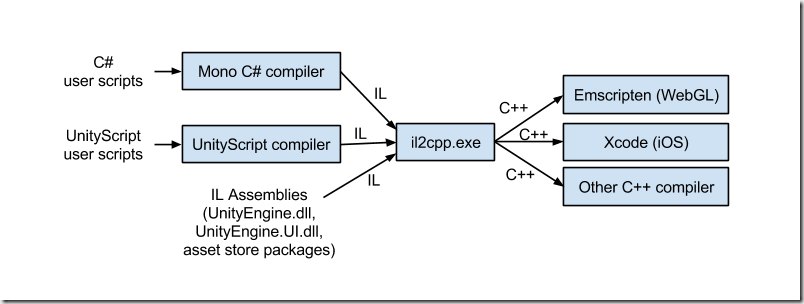
Note that, this scripting backend will generate a file called "global-metadata.dat", this file is platform-independent, created by this scripting backend containing all the metadata for the application ( such as methods, properties, fields... ). I won't go further about this, I would like to keep this beginner friendly, but in case you are interested [here](https://katyscode.wordpress.com/2020/12/27/il2cpp-part-2/) is an interesting write up about it.
But also a native binary compiled from C++, named "GameAssembly.dll".
This is going to be a basic tutorial that covers the basics of IL2CPP game hacking, there will be more posts, more in depth, but in the meantime if you have any questions, feel free to ask them under this post.
From now on, throughout this post, we'll attack a game called "Redmatch 2", but you can apply it for the game you want.
## [I] Reversing the game.
In this section, we will explore the tools we can use to reverse this game and after we will attack it.
The first tool that we will need is [Il2CppDumper](https://github.com/Perfare/Il2CppDumper), we will also need IDA or [Ghidra](https://github.com/NationalSecurityAgency/ghidra) (free) if you don't have it and last thing we need is [dnSpy](https://github.com/dnSpy/dnSpy)
We will simply try to get our local player, instance.
1. Starting from scratch (Recon)
- Looking at the game directory, we can see different files

With the information we aknowledged earlier, we are certain that we are facing an IL2CPP compiled game.
2. Dumping the game.
- For this step, we are going to use Il2Cpp Dumper because, this is a great tool and it will simplify a lot of work for us. It will basically extract all the metadata information and try to restore the .Net dlls that we can look into using dnSpy, but we won't have function bodies. Run Il2CppDumper.exe, and import the GameAssembly.dll or libil2cpp.so and then the file containing all the metadata. This should be your output :

3. Analysis of the game with dnSpy and IDA.
- Open dnSpy and drag the Assembly-CSharp.dll inside dnSpy which is typically the assembly containing the core game code. To put it simply, an assembly refers to compiled code that make up to a .NET application.
- When we open that assembly, we get all these namespaces, those will be useful later on.

- the "-" namespace, most of the time, will hold the game code, we can open it and search for strings like "Player", if it isn't obfuscated.

Here we can see a private field, most likely our networked local player, that we can verify using the next tool, IDA.
- Il2Cpp Dumper has some helper scripts, like "ida_with_struct.py" or "ghidra_with_struct", that we can use to simplify the process. These scripts will use 2 files that we generated previously "script.json" and "il2cpp.h", the scripts will parse the script.json and rename all the data he could restore before but inside IDA or Ghidra.
In order to verify our previous theory, we can either search for the class and function name, or use the RVA (relative virtual address) and then look for references of the function.

And yeah, it is used in many place which means it may be what we are looking for, but let me spoil, it isn't what we're looking for really haha.
What we are really looking for is this : 
because this class has a lot of methods and fields, its name is what we might look for, and after reversing it a bit I can tell that's what we want.
Make sure to make good of use of Cheat Engine, because it makes things even simpler, you can basically use the Mono dissector, to get information about anything you want in the game :)
And that's about it for getting our local player, we will now see, how we can use that information to attack the game, we will try to get our positions, but be aware that the game has a small anticheat that I did not try look at because I wasn't planning on modifying my speed or anything :D
## [II] Attacking the game.
In this section, we will explore on how we can access our local player and we will try to get our position ! (Internal)
Earlier we have learnt about getting our local player, for this game, keep in mind that it can be a little bit different for your game but it should be quite the same.
There are 2 main ways of accessing our local player, we could either scaffold the IL2CPP api, with the exported functions from the dll, or we could use the data from our dump. I'll opt for the latter choice, because it will be easier to get things going and I can reserve the scaffolding for another post :D
Let's start creating a new project and making our dll.
We can import some of our structures that are inside il2cpp.h, that we find useful, for me it's this one :
```cpp
struct PlayerController_StaticFields {
bool _IsStandingOnTeammate_k__BackingField;
struct System_Action_MyceliumPlayer__DamageData____o* OnDie;
struct System_Action_ItemEnum__o* OnSuccessfulShot;
struct System_Action_PlayerController__o* OnSpawn;
struct System_Action_MyceliumPlayer__int__o* OnWeaponSwitched;
struct System_Action_o* OnShotTeammate;
struct PlayerController_o* LocalInstance;
bool Interacting;
bool WasInteracting;
};
struct PlayerController_c {
Il2CppClass_1 _1;
struct PlayerController_StaticFields* static_fields;
void* rgctx_data;
Il2CppClass_2 _2;
void** vtable;
};
bool WINAPI DllMain(HMODULE mod, DWORD ul_reason_for_call, LPVOID lpReserved)
{
if (ul_reason_for_call == DLL_PROCESS_ATTACH)
{
const HANDLE thread_handle = CreateThread(0, 0,
reinterpret_cast<LPTHREAD_START_ROUTINE>(main_thread),
mod, 0, 0);
if (thread_handle)
{
DisableThreadLibraryCalls(mod);
CloseHandle(thread_handle);
}
}
return TRUE;
}
```
because that's what I'm going to use in order to get, make sure to also import the structure for Il2CppClass_1 and Il2CppClass_2.. also set up our entry point
```cpp
struct Vector3
{
float x, y, z;
Vector3(float _x, float _y, float _z) : x(_x), y(_y), z(_z) {}
std::string ToString()
{
return "(" + std::to_string(x) + ", " + std::to_string(y) + ", " + std::to_string(z) + ")";
}
};
bool WINAPI main_thread(HMODULE module)
{
FILE* io_stream;
AllocConsole();
freopen_s(&io_stream, "CONOUT$", "w", stdout);
SetConsoleTitleA("[DEBUG]@RedMatch 2");
const uintptr_t game_assembly = reinterpret_cast<uintptr_t>(GetModuleHandleA("GameAssembly.dll")); // base address of gameassembly
using unity_component_get_transform_t = uintptr_t(*)(uintptr_t component); // external function from Unity Engine
using unity_transform_get_position = Vector3(*)(uintptr_t transform);
unity_component_get_transform_t unity_get_transform = reinterpret_cast<unity_component_get_transform_t>(game_assembly + 14839136); // UnityEngine.Component$$get_transform" inside.json
unity_transform_get_position unity_get_position = reinterpret_cast<unity_transform_get_position>(game_assembly + 14970016); // UnityEngine.Transform$$get_position inside script.json
while (true) {
PlayerController_c* player_class = *reinterpret_cast<PlayerController_c**>(game_assembly + 30097512); // the 30097512, comes from PlayerController_TypeInfo, which is used to access the static fields, but not only that :D
uintptr_t local_player_instance = reinterpret_cast<uintptr_t>(player_class->static_fields->LocalInstance);
if (local_player_instance == 0 || *reinterpret_cast<uintptr_t*>(local_player_instance + 0x10) == 0) // m_cachedptr [0x10] to make sure that we will not attempt to do something with an invalid object, and local player can be null if we inject while in main menu
std::cout << "We are not in game.\n";
else
{
uintptr_t local_player_transform = unity_get_transform(local_player_instance);
Vector3 local_player_position = unity_get_position(local_player_transform);
std::cout << "Our local player class is at: 0x" << local_player_instance << " pos: " << local_player_position.ToString() << std::endl;
}
if (GetAsyncKeyState(VK_INSERT)) break;
std::this_thread::sleep_for(std::chrono::milliseconds(200));
}
FreeConsole();
FreeLibraryAndExitThread(module, 0);
}
```
The Unity Engine make use of a lot of abstraction, for instance this class inherits from many other classes, meaning that we can get their fields, like I did for getting "m_Cachedptr" which is inside the Object class. You can also stack components on a gameobject, basically our Player Controller may hold another component that we could such as the Camera, but up to you to figure out how to do it :D

And moment of truth :

We did it !1!1!1!!
All we did is just read our position, but with a few lines (3) we can make a teleport hack :O, I'll let you and your creativity to make it happen :D
I hope you guys enjoyed, if you have any questions, feel free to ask them under this post.
 Sign in via Google
 Sign in via Facebook
 Sign in via X(Twitter)
 Sign in via GitHub
 Sign in via Dropbox
 Sign in with Wallet
Connect another wallet
Sign in with Wallet
Connect another wallet