# Databases
## Basic SQL
```sql
SELECT *
FROM tablename
WHERE condition(s)
GROUP BY columnname [, columnname ...]
HAVING codition(s)
ORDER BY columnname ASC/DESC
```
#### Comments
Single line comments start with --.
Any text between -- and the end of the line will be ignored (will not be executed). This can also be used after a command.
Example:
```sql
-- Select all:
SELECT * FROM Customers; -- taking data from customers
```
Multi-line comments start with /* and end with \*/.
Any text between /* and \*/ will be ignored.
Example:
```sql
/*SELECT * FROM Customers;
SELECT * FROM Products;
SELECT * FROM Orders;
SELECT * FROM Categories;*/
SELECT * FROM Suppliers;
```
Can also be used to leave a part out for testing
Example:
```sql
SELECT * FROM Customers WHERE (CustomerName LIKE 'L%'
OR CustomerName LIKE 'R%' /*OR CustomerName LIKE 'S%'
OR CustomerName LIKE 'T%'*/ OR CustomerName LIKE 'W%')
AND Country='USA'
ORDER BY CustomerName;
```
### SELECT
Distinct removes all duplicates
```sql
SELECT DISTINCT Country
FROM Customers
```
AS can change column name in the output called an ALIAS
```sql
SELECT count(Country) AS TotalCountries
FROM Customers
```
### FROM
JUST GIVE THE FUCKING TABLE NAME THAT YOU WANT TO USE.
### WHERE
Only works on individual rows. (<-> `HAVING`)
#### Operators
operator | description
:---:|:--------------
= | Equal
> | Greater than
< | Less than
>= | Greater than or equal
<= | Less than or equal
<> | Not equal. Note: In some versions of SQL this operator may be written as !=
BETWEEN | Between a certain range
LIKE | Search for a pattern
IN | To specify multiple possible values for a column
#### Wildcards
Wildcards are always used in combination with operators `LIKE` , `NOT LIKE`
symbol | description | example
:---:|:--------------| :---------
%|Represents zero or more characters | bl% could find bl, black, blue, bl...
_ | Represents a single character | h_t could find hot, hat, hit, ...
[] | Represents any single character within the brackets | h[oa]t could find hot and hat, but not hit
^ | Represents any character not in the brackets | h[^oa]t finds hit, but not hot and hat
- | Represents a range of characters | c[a-b]t finds cat and cbt
Example:
Give all customers name starting with an 'a'.
```sql
SELECT *
FROM Customers
WHERE CustomerName LIKE 'a%';
```
### GROUP BY
The table is divided into groups of rows with common characteristics.
There's 1 unique row per group.
For each group statistical functions can be applied.
Example:
Show per type the number of products that have more than 10 items in stock.
```sql
SELECT ProductTypeID,count(productid)
FROM Product
WHERE unitsinstock > 10
GROUP BY ProductTypeID
```
### HAVING
Only works on groups. (<-> `WHERE`)
Selects or rejects groups based on group characteristics.
Example:
Show per type that contains more than 10 products with more than 10 units in stock the number of products.
```sql
SELECT ProductTypeID,count(productid)
FROM Product
WHERE unitsinstock > 10
GROUP BY ProductTypeID
HAVING COUNT(PRODUCTID) > 10
```
### ORDER BY
The order by keyword is used to sort output in `ASC`-ending or `DESC`-ending order. This can be done on columns. Default is ascending.
Example:
Give all products, order names on productname and then product description descending.
```sql
SELECT ProductName, ProductDescription
FROM Products
ORDER BY ProductName, ProductDescription DESC
```
### CASE
The CASE statement goes through conditions and returns a value when the first condition is met (like an IF-THEN-ELSE statement). So, once a condition is true, it will stop reading and return the result. If no conditions are true, it returns the value in the ELSE clause.
If there is no ELSE part and no conditions are true, it returns NULL.
Example:
Give the product price indicator under 10 euro, between 10 and 20 and above 20 euro.
```sql
SELECT ProductName,
CASE
WHEN price <= 10 THEN 'oh that is cheap'
WHEN price BETWEEN 10 and 20 THEN 'hmmmm'
WHEN price > 10 THEN 'hmmmmmmmmmmm no.'
ELSE 'wait there is no price so it is free???'
END AS PriceIndicator
FROM PRODUCTS
```
### Statistical Functions
There are 5 standard functions, these functions give one answer per group/column.
These functions can ONLY be used in `SELECT`, `HAVING`, `ORDER BY`.
They CANNOT be used in `WHERE` and `GROUP BY`.
ALL statistical functions negate NULL values except for `COUNT(*)`.
##### COUNT, AVG, SUM
The `COUNT()` function returns the number of rows that matches a specified criteria.
This function can also be used with the `DISTINCT` keyword to only count the different values.
Example:
Count the amount of products with a price higher then 10.
```sql
SELECT COUNT(*)
FROM products
WHERE price > 10
```
The `AVG()` function returns the average value of a numeric column.
Example:
Give the average price of all the products.
```sql
SELECT AVG(Price)
FROM products
```
The `SUM()` function returns the total sum of a numeric column.
Example:
Give the sum of all products prices.
```sql
SELECT SUM(price)
FROM products
```
##### MIN and MAX
The `MIN()` function returns the smallest value of the selected column.
Example:
Give the lowest price from the products.
```sql
SELECT MIN(price)
FROM products
```
The `MAX()` function returns the largest value of the selected column.
Example:
Give the most expensive price of our products.
```sql
SELECT MAX(price)
FROM products
```
##### TOP
Examples:
Select the top 5 of the cheapest products.
```sql
SELECT TOP 5 productid, unitprice
FROM product
ORDER BY unitprice
```
5 most expensive products.
```sql
SELECT TOP 5 productid, unitprice
FROM product
ORDER BY unitprice DESC
```
### JOIN
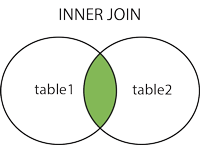
#### (INNER) JOIN
Returns records that have matching values in both tables.
```sql
SELECT column_name(s)
FROM table1
INNER JOIN table2
ON table1.column_name = table2.column_name;
```
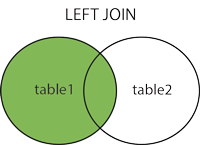
#### LEFT (OUTER) JOIN
Returns all records from the left table, and the matched records from the right table.
```sql
SELECT column_name(s)
FROM table1
LEFT JOIN table2
ON table1.column_name = table2.column_name;
```
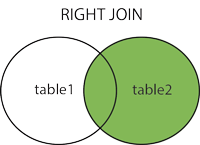
#### RIGHT (OUTER) JOIN
Returns all records from the right table, and the matched records from the left table.
```sql
SELECT column_name(s)
FROM table1
RIGHT JOIN table2
ON table1.column_name = table2.column_name;
```
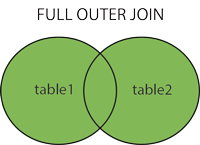
#### FULL (OUTER) JOIN
Returns all records when there is a match in either left or right table.
```sql
SELECT column_name(s)
FROM table1
FULL OUTER JOIN table2
ON table1.column_name = table2.column_name
WHERE condition;
```
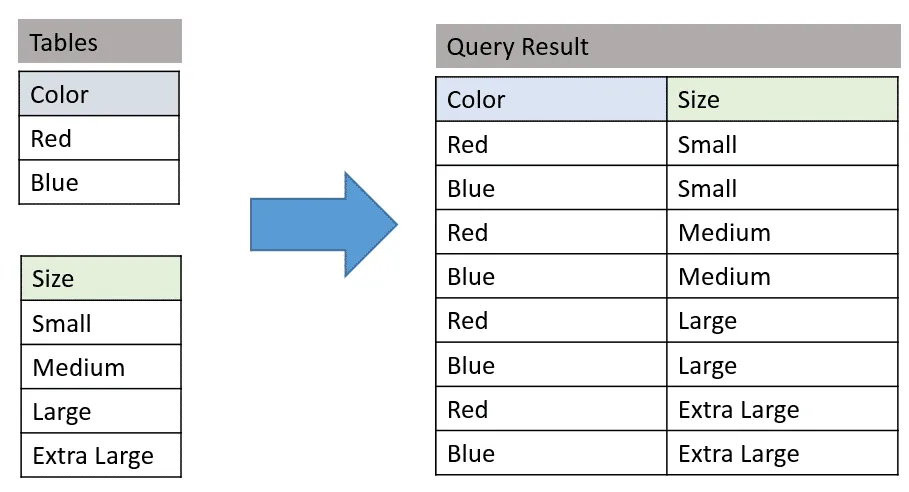
#### CROSS JOIN
Takes all posible combinations
```sql
SELECT *
FROM color
CROSS JOIN size;
```
### UNION
Combines the result of 2 or more queries.
Both `SELECT` statements contain an equal amount of columns with compatible data types.
Only the column names of the 1st column are shown.
The result DOES NOT contain duplicates, otherwise use `UNION ALL`.
`ORDER BY` can be added at the end to order both results together.
Example:
Give an overview of all employees (lastname and firstname, city and postal code) and all customers (name, city and postal code).
```sql
SELECT lastname+ ' ' + firstnameas name, city, postalcode
FROM Employee
UNION
SELECT customername, city, postalcode
FROM Customer
```
### INTERSECTION
Which records are in the intersection?
```sql
SELECT city, country
FROM customer
INTERSECT
SELECT city, country
FROM supplier
```
### EXCEPT
The `EXCEPT` operator subtracts a result set from another result set.
Which products have never been ordered?
```sql
SELECT productid
FROM product
EXCEPT
SELECT productid
FROM ordersdetail;
```
<iframe src="https://drive.google.com/file/d/1OFobskL5tLvnpR6Xn_kpZszTqksfRde1/preview?usp=sharing" width="580px" height="480px"></iframe>
 Sign in with Wallet
Connect another wallet
Sign in with Wallet
Connect another wallet