# 發明展: 定時提醒藥包座
###### tags: `Arduino`
[Arduino作品目錄](https://hackmd.io/KH0oMN6ZSiuiogFCy5s_mA)
## 概念簡述
設計一個定時鬧鐘,在使用者設定的吃藥時間發出鈴聲來提醒他吃藥。
## 功能設計
### (P)套件需求
1. 時鐘模組 DS1302
2. 顯示模組 LCD1602-I2C
3. 蜂鳴器模組
4. 4×4薄膜鍵盤模組
### (P)功能描述
透過`4×4薄膜鍵盤模組`讓使用者輸入指定吃藥時間,最大紀錄為3組。
顯示模組`LCD1602-I2C`可以透過時鐘模組`DS1302`顯示當前時間,也能配合使用者輸入指定時間。
若目前時間為吃藥時間,則透過`蜂鳴器`發出警報音來提示使用者,使用者可以按任意鍵來停止蜂鳴器,表示自己已經收到吃藥提醒。
### (P)邏輯設計
依照上述功能需求,我們可以將功能簡單分為三個運作狀態:
:::info
**1. 設定模式 :**
+ 設定1~3筆吃藥時間
**2. 正常模式 :**
+ 持續顯示時間
+ 持續偵測是否為吃藥時間
**3. 警報模式 :**
+ 發出警報,使用者可以輸入任何按鍵來跳出該模式來回到正常模式
:::
### (P)示意圖
了解上述三種模式後,便可以設計以下運作流程
```mermaid
graph TD;
A(等待進入選擇模式)-->|按鍵輸入'A'|B(選擇模式)
B-->|按鍵輸入'1'|C(設定模式)
B-->|按鍵輸入'2'|D(正常模式)
C-->|設定完畢|E(等待進入選擇模式)
D-->|按鍵輸入'*'|E
D-->|目前是吃藥時間|F(警報模式)
F-->|按任意鍵停止警報|D
```
## 模組簡介
### (P) 時鐘模組 DS1302
+ 用來讀取時間用,因為能夠裝鋰電池,所以UNO板沒接電也能繼續計算時間,主板斷電重連不會影響時間計算。
+ 可以把它當作沒顯示螢幕的手錶,會持續計時。
+ 需要鈕扣型電池3V專用鋰電池
#### 接腳配置
||DS1302|UNO板|
|:------:|:------:|:------:|
|正電源|VCC|5V|
|接地|GND|GND|
||CLK|D13|
||DAT|D12|
||RST|D11|
___
### (P) 顯示模組 LCD1602-I2C
+ 一列16格可放16個英數字,總共兩列共32格可以輸出結果
+ 背後藍色區塊的灰色螺絲可以轉動來調整對比度,==數字不清楚很可能是沒有調整好而非沒電==。
+ LCD1602-I2C是LCD1602上增加了 I2C轉接板,把原本很多接腳的LCD1602改良為只需要四個接腳就可以使用,可以參考下圖黑色模塊便是I2C轉接板。

#### 接腳配置
||LCD1602-IC2|UNO板|
|:------:|:------:|:------:|
|正電源|VCC|5V|
|接地|GND|GND|
|時脈線|SDA|A4(SDA)|
|數據線|SCL|A5(SCL)|
___
### (P)蜂鳴器
發出警報聲
||蜂鳴器|UNO板|
|:------:|:------:|:------:|
|正電源|VCC|5V|
|接地|GND|GND|
|資訊傳輸|I/O|D2|
___
### (P) 4×4薄膜鍵盤模組
用來設置鬧鐘時間,跟輸入切換模式的指令,解除警報聲等等
#### 接腳
|薄膜鍵盤模組|UNO板|
|:------:|:------:|
|左1|D9|
|左2|D8|
|左3|D7|
|左4|D6|
|左5|D5|
|左6|D4|
|左7|D3|
|左8|D2|
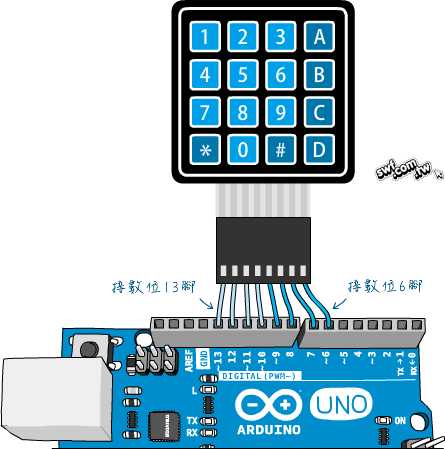
[圖片來源: 圖解系列圖書](https://swf.com.tw/?p=917)
## 參考文章
### 4×4薄膜鍵盤模組
Arduino 4×4薄膜鍵盤模組實驗(一):按鍵掃描程式原理說明
https://swf.com.tw/?p=917
<Keypad.h>
https://github.com/Chris--A/Keypad
### LCD 1602 I2C
快速設定
https://blog.gtwang.org/iot/ywrobot-arduino-lcm-1602-iic-v1-lcd-display/
#include LiquidCrystal_PCF8574
https://github.com/mathertel/LiquidCrystal_PCF8574
Arduino-LiquidCrystal-I2C-library
https://github.com/fdebrabander/Arduino-LiquidCrystal-I2C-library
Arduino-LiquidCrystal-I2C-library POSTIVE
https://forum.arduino.cc/t/20x4-lcd-not-working-help-needed/584886/2
【Arduino】LCD I2C模組使用教學
https://crazymaker.com.tw/arduino-lcd-i2c-tutorial/
台南市教育局科技教育網 7-1 LCD基本使用
http://maker.tn.edu.tw/modules/tad_book3/page.php?tbsn=16&tbdsn=284
[Arduino範例] DS1302時鐘模組快速上手
https://blog.jmaker.com.tw/ds1302/
BUG分享文:
https://kairaygoodman.blogspot.com/2016/04/arduinolcd1602i2c.html
### DS1302
<ThreeWire.h>下載
https://github.com/Makuna/Rtc/blob/master/src/ThreeWire.h
CLK:13
DAT:12
RST:11
快速測試文章:
https://blog.jmaker.com.tw/ds1302/
## (P)程式碼
+ 實際套件組合完成後的接腳配置以程式碼為主
```cpp=
#include<Wire.h>
#include<LiquidCrystal_I2C.h>
#include <ThreeWire.h>
#include <RtcDS1302.h>
#include <Keypad.h>
//LCD
LiquidCrystal_I2C lcd(0x27,16,2);
/* DS1302
* 接線指示: 可依需求修改
* DS1302 CLK/SCLK --> 10 -->13
* DS1302 DAT/IO --> 9 -->12
* DS1302 RST/CE --> 8 -->11
* DS1302 GND --> GND
*/
RtcDateTime dt;
ThreeWire myWire(12, 13, 11); // IO, SCLK, CE
RtcDS1302<ThreeWire> Rtc(myWire);
//預設3組鬧鐘時間為 100:100:100
int t1h=100;
int t2h=100;
int t3h=100;
int t1m=100;
int t2m=100;
int t3m=100;
int t1s=100;
int t2s=100;
int t3s=100;
//r1,r2,r3 表示三組鬧鐘是否近期已經觸發過,具體用途在 detectAlarm()..
bool r1=false;
bool r2=false;
bool r3=false;
//keypad
#define KEY_ROWS 4 // 按鍵模組的列數
#define KEY_COLS 4 // 按鍵模組的行數
char keymap[KEY_ROWS][KEY_COLS] = {
{'1', '2', '3', 'A'},
{'4', '5', '6', 'B'},
{'7', '8', '9', 'C'},
{'*', '0', '#', 'D'}
};
byte colPins[KEY_COLS] = {5, 4, 3, 2}; // 按鍵模組,行1~4接腳。
byte rowPins[KEY_ROWS] = {9, 8, 7, 6}; // 按鍵模組,列1~4接腳。
// 初始化Keypad物件
// 語法:Keypad(makeKeymap(按鍵字元的二維陣列), 模組列接腳, 模組行接腳, 模組列數, 模組行數)
Keypad myKeypad = Keypad(makeKeymap(keymap), rowPins, colPins, KEY_ROWS, KEY_COLS);
//蜂鳴器接腳
int buzzer_pin=10;
void setup() {
//LCD初始設定
lcd.init();
lcd.setBacklight(255);
lcd.setCursor(0,0);
lcd.print("loading ...");
//DS1302 CLOCK
Serial.begin(9600);
Serial.print("compiled: ");
Serial.print(__DATE__);
Serial.println(__TIME__);
Rtc.Begin();
//__DATE__,__TIME__,是程式碼編譯時的日期和時間
RtcDateTime compiled = RtcDateTime(__DATE__, __TIME__);
//DS1302意外狀況處理
if (!Rtc.IsDateTimeValid())
{
// Common Causes:
// 1) first time you ran and the device wasn't running yet
// 2) the battery on the device is low or even missing
Serial.println("RTC lost confidence in the DateTime!");
Rtc.SetDateTime(compiled);
}
if (Rtc.GetIsWriteProtected())
{
Serial.println("RTC was write protected, enabling writing now");
Rtc.SetIsWriteProtected(false);
}
if (!Rtc.GetIsRunning())
{
Serial.println("RTC was not actively running, starting now");
Rtc.SetIsRunning(true);
}
//判斷DS1302上紀綠的時間和編譯時的時間,哪個比較新
//如果編譯時間比較新,就進行設定,把DS1302上的時間改成新的時間
//now:DS1302上紀綠的時間,compiled:編譯時的時間
RtcDateTime now = Rtc.GetDateTime();
if (now < compiled)
{
Serial.println("RTC is older than compile time! (Updating DateTime)");
//編譯時間比較新,把DS1302上的時間改成編譯的時間
Rtc.SetDateTime(compiled);
}
else if (now > compiled)
{
Serial.println("RTC is newer than compile time. (this is expected)");
}
else if (now == compiled)
{
Serial.println("RTC is the same as compile time! (not expected but all is fine)");
}
//蜂鳴器
pinMode( buzzer_pin,OUTPUT);
}
/* loop()
* 等待進入選擇模式
*/
void loop() {
//setCursor(0,0)表示上排列文字設定
//setCursor(0,1)表示第一列文字設定
lcd.setCursor(0,0);
lcd.print("chooseMode...");
lcd.setCursor(0,1);
lcd.print("...");
delay(2000);
bool changemode =detectchange();
//若偵測到輸入'A',則進入選擇模式
if(changemode)
gotoMode();
}
// 判斷是否收到輸入'A'
bool detectchange()
{
lcd.print("press A...");
char key = waitforinput();
if (key=='A')
return true;
else
return false;
}
//選擇進入設定模式或者正常模式
void gotoMode()
{
char key ;
bool flag= true;
lcd.setCursor(0,1);
lcd.print("press 1 or 2...");
while(flag){
key = waitforinput();
switch(key)
{
case '1':
SettingMode();
flag=false;
break;
case '2':
NormalMode();
flag=false;
break;
default:
lcd.print("input not1or2");
delay(2000);
break;
}
}
}
//設定模式
void SettingMode()
{
//r1~r3預設鬧鐘近期未被觸發
r1=false;
r2=false;
r3=false;
String temp="";
char key;
int times;
lcd.clear();
lcd.setCursor(0,0);
lcd.print("Setting...");
lcd.setCursor(0,1);
lcd.print("1.times a day...");
delay(2000);
//先確認有幾組吃藥時間要設定
while(true)
{
key=waitforinput();
if(key=='1'||key=='2'||key=='3')
break;
else
lcd.print("wrong input...");
delay(2000);
}
temp=key+" times a day...";
lcd.setCursor(0,1);
lcd.print(temp);
times=key-'0';
//每次進入setHMS(n),設定第n組時間
for(int i=0;i<times;i++)
setHMS(i+1);
//將第n組以外的時間還原為100:100:100,避免連續設定時產生錯誤
delHMS(times);
lcd.print("done...");
delay(2000);
}
//設定吃藥時間,每次設定第n組
void setHMS(int n)
{
char key1,key2;
String temp="";
int hour = setHour();
delay(2000);
int minute=setMinute();
delay(2000);
int second=setSecond();
delay(2000);
lcd.clear();
lcd.setCursor(0,1);
lcd.print(temp);
temp="set"+String(hour) + ":" + String(minute) + ":" +String(second);
delay(2000);
switch(n){
case 1:
t1h=hour;
t1m=minute;
t1s=second;
break;
case 2:
t2h=hour;
t2m=minute;
t2s=second;
break;
case 3:
t3h=hour;
t3m=minute;
t3s=second;
break;
default:
lcd.print("setHMS error..");
break;
}
}
int setHour()
{
char key1,key2;
String temp="";
while(true)
{
lcd.setCursor(0,1);
lcd.print("set hours....");
key1=waitforinput();
if(key1>='0' && key1<='2')
{
break;
}
else
lcd.print("wrong input...");
delay(2000);
}
temp=key1+"";
lcd.clear();
lcd.setCursor(0,1);
lcd.print(key1);
delay(1000);
while(true)
{
lcd.print("set hours....");
key2=waitforinput();
if(key1=='0' && (key2>='0' && key2<='9') )
{
break;
}
else if(key1=='1' && (key2>='0' && key2<='9') )
{
break;
}
else if(key1=='2' && (key2>='0' && key2<='4'))
{
break;
}
else
lcd.print("wrong input...");
delay(2000);
}
temp=String(key1)+String(key2);
lcd.clear();
lcd.setCursor(0,1);
lcd.print(temp);
delay(1000);
int hour= (key1-'0')*10+key2-'0';
return hour;
}
int setMinute()
{
char key1,key2;
String temp="";
lcd.setCursor(0,1);
while(true)
{
lcd.print("set minutes...");
key1=waitforinput();
if(key1>='0' && key1<='5')
break;
else
lcd.print("wrong input...");
delay(2000);
}
temp=key1+"";
lcd.clear();
lcd.setCursor(0,1);
lcd.print(key1);
delay(1000);
while(true)
{
lcd.print("set minutes...");
key2=waitforinput();
if(key2>='0' && key2<='9' )
break;
else
lcd.print("wrong input...");
delay(2000);
}
lcd.clear();
lcd.setCursor(0,1);
temp=String(key1)+String(key2);
lcd.print(temp);
int mintute= (key1-'0')*10+key2-'0';
return mintute;
}
int setSecond()
{
char key1,key2;
String temp="";
lcd.setCursor(0,1);
while(true)
{
lcd.print("set seconds...");
key1=waitforinput();
if(key1>='0' && key1<='5')
break;
else
lcd.print("wrong input...");
delay(2000);
}
temp=String(key1)+"";
lcd.clear();
lcd.setCursor(0,1);
lcd.print(key1);
delay(1000);
while(true)
{
lcd.print("set minutes...");
key2=waitforinput();
if(key2>='0' && key2<='9' )
break;
else
{
lcd.clear();
lcd.print("wrong input...");
}
delay(2000);
}
temp=String(key1)+String(key2);
lcd.clear();
lcd.setCursor(0,1);
lcd.print(temp);
int sec= (key1-'0')*10+key2-'0';
return sec;
}
//將第n組以外的時間還原為100:100:100,避免連續設定時產生錯誤
void delHMS(int n)
{
if(n<=2)
{
t3h=100;
t3m=100;
t3s=100;
}
if(n<=1)
{
t2h=100;
t2m=100;
t2s=100;
}
}
/* 正常模式
* 1. 透過輸入'*',跳出正常模式,回到等待進入選擇模式
* 2. 持續更新LCD上的時間顯示
* 3. 偵測到是吃藥時間後,進入警報模式
*/
void NormalMode()
{
String temp="";
while( myKeypad.getKey()!='*')
{
lcd.clear();
lcd.setCursor(0,0);
lcd.print("Normal Mode");
lcd.setCursor(0,1);
dt= Rtc.GetDateTime();
int h=int(dt.Hour());
int m=int(dt.Minute());
int s=int(dt.Second());
if(s<=9)temp=String(h)+":"+String(m)+":0"+String(s);
else temp=String(h)+":"+String(m)+":"+String(s);
lcd.print(temp);
delay(500);
//偵測是否為吃藥時間
bool flag=detectAlarm(h,m,s);
if(flag)
{
AlarmMode();
break;
} //if
}//while
}//void
/* detectAlarm()
* 除了需要偵測是否為吃藥時間
* 需要r1~r3來輔助判別是否警報已經觸發過且被使用者解除
* 來避免同一分鐘解除後又觸發警報的狀況
*/
bool detectAlarm(int h , int m, int s)
{
bool b=false;
if(t1h==h && t1m == m && t1s<=s && r1==false)
{
b=true;
r1=true;
}
else if(t2h==h && t2m == m && t2s<=s && r2==false)
{
b=true;
r2=true;
}
else if(t3h==h && t3m == m && t3s<=s && r3==false)
{
b=true;
r3=true;
}
if(r1==true && t1m != m)
{
r1=false;
}
if(r2==true && t2m != m)
{
r2=false;
}
if(r3==true && t3m != m)
{
r3=false;
}
return b;
}
/*警報模式
* 持續響一段時間後停止,或者由使用者按任意鍵解除警報
*
*/
void AlarmMode()
{
int count=0;
char key ;
lcd.setCursor(0,0);
lcd.print("time to pills...");
lcd.setCursor(0,1);
lcd.print("press any key...");
while(count++<200)
{
tone( buzzer_pin,523);
key = myKeypad.getKey();
if(key)break;
delay(300);
}
noTone( buzzer_pin);
}
char waitforinput(){
char c ='N';
lcd.setCursor(0,0);
lcd.print("wait for input...");
bool flag=true;
while(flag)
{
char key = myKeypad.getKey();
switch(key){
case '0':
c= '0';
flag=false;
break;
case '1':
c= '1';
flag=false;
break;
case '2':
c= '2';
flag=false;
break;
case '3':
c= '3';
flag=false;
break;
case '4':
c= '4';
flag=false;
break;
case '5':
c= '5';
flag=false;
break;
case '6':
c= '6';
flag=false;
break;
case '7':
c= '7';
flag=false;
break;
case '8':
c= '8';
flag=false;
break;
case '9':
c= '9';
flag=false;
break;
case 'A':
c='A';
flag=false;
break;
case 'B':
c= 'B';
flag=false;
break;
case 'C':
c= 'C';
flag=false;
break;
case 'D':
c= 'D';
flag=false;
break;
case '*':
c= '*';
flag=false;
break;
case '#':
c= '#';
flag=false;
break;
default:
break;
}
}//while
return c;
}//waitforinput
```
 Sign in with Wallet
Connect another wallet
Sign in with Wallet
Connect another wallet