# Refresher: Iteration 1
---
### Question
What is the output of the following?
```python
a = 3
a *= 4
print(a)
```
**Choices***
- [ ] 3
- [ ] 4
- [ ] 7
- [x] 12
---
### Question
What is the output of the following?
```python
a = 5
if(a < 6):
print('Option 1')
if(a < 3):
print('Option 2')
else:
print('Option 3')
```
**Choices**
- [ ] Option 1
- [ ] Option 2
- [ ] Option 3
- [x] Option 1
Option 3
---
### Question
What is the output of the following?
```python
a = 1
b = 0
c = 1
if ( a and b):
print("Option 1")
elif (a and c):
print("Option 2")
else:
print("Option 3")
```
**Choices**
- [ ] Option 1
- [x] Option 2
- [ ] Option 3
- [ ] Option 4
---
### Question
What is the output of the following?
```python
count = 0
while(count < 10):
print(10, end = ' ')
```
**Choices**
- [ ] 0 1 2 3 4 5 6 7 8 9
- [ ] Infinite Loop
- [x] 10 10 10 10 10 10 10 10 10 10
---
## Introduction
* Imagine we wish to print the numbers from `1` to `1000`.
* So we can write the code as follows:
```python
print(1)
print(2)
..
..
..
print(1000)
```
* This is not an intelligent task to do. If the task is simple and we want to repeat it 5 times, we might write the same piece of code 5 times But this is not a practical approach if the repetition number is like `100` or `1000`.
* There is a principle in programming called **DRY**
Do you know the full form of it?
* **Don't Repeat Yourself**
* Even if you are writing the same code three times, you are not doing a good job at it. We can either use loops or functions.
* Before seeing loops, let us see why Python does things in a certain way.
* I have a friend Ramesh and I have to take `10` toffies from him. I will pick a chocolate and start counting from `1` until I reach `10` and then stop.
* Let us see in code what we are doing. Each time in a loop we will check if condition until we reach the else part.
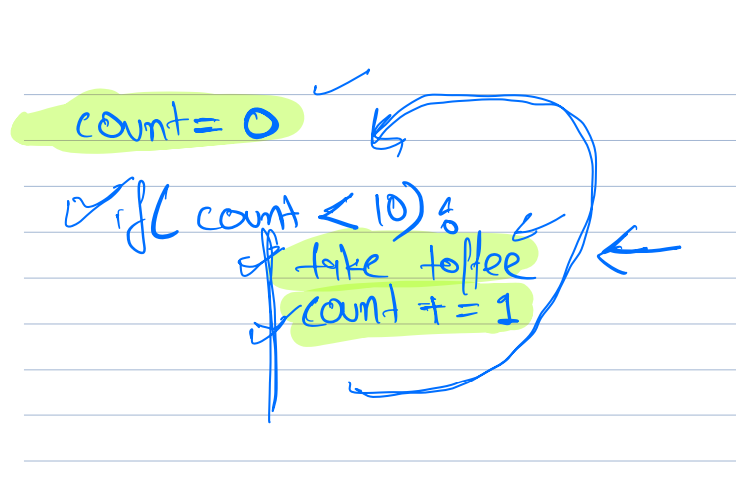
```python
count = 0
if(count < 10):
take toffee
count += 1
else
stop
```
* There are four things we always do in a loop:
1. Initialization
2. Condition
3. Action
4. Updation
* We will discuss the `while` loop in this class and the `for` loop in the next as it is different in different programming languages.
* The while loop will only run till the condition is true. As soon as the condition becomes false we exit the loop and execute the rest of the code.
### Syntax
```python
variable initialization
while (condition)
{
action
update variable
}
```
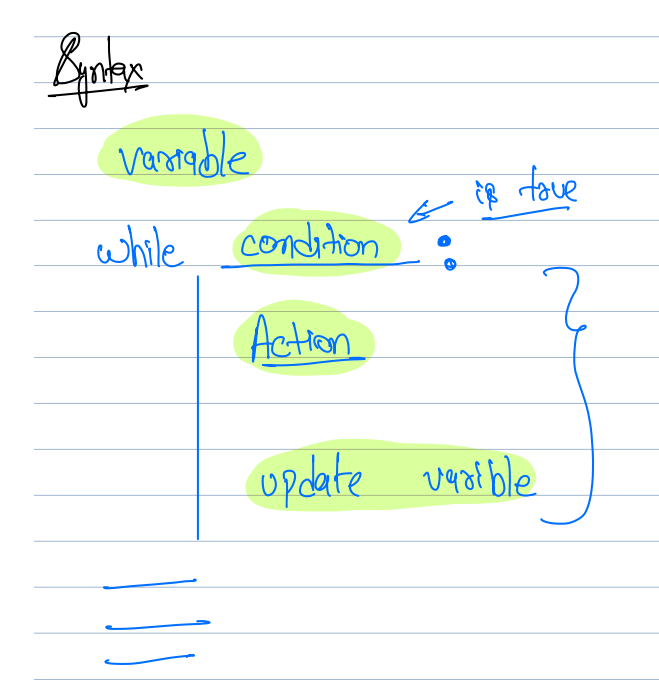
This can be read as while this condition is **true** perform this action and update the variable.
Let us quickly move to an example to understand better.
---
## Print numbers from 1 to n
### Example 1 - Print Numbers from 1 to n
```python
n = input()
count = 1
while(count <= n): # can also be written as (count < n + 1)
print(count)
count += 1
print("end")
```
* Parenthesis are optional in while condition.
* Dry run for n = 5
If I do not write the incrementing `count` statement what will happen?
It will fall in the infinite loop and `1` will be printed forever.
* Always ensure you have all 4 things while writing a loop.
* In any programming language all the loops will always have these four things.
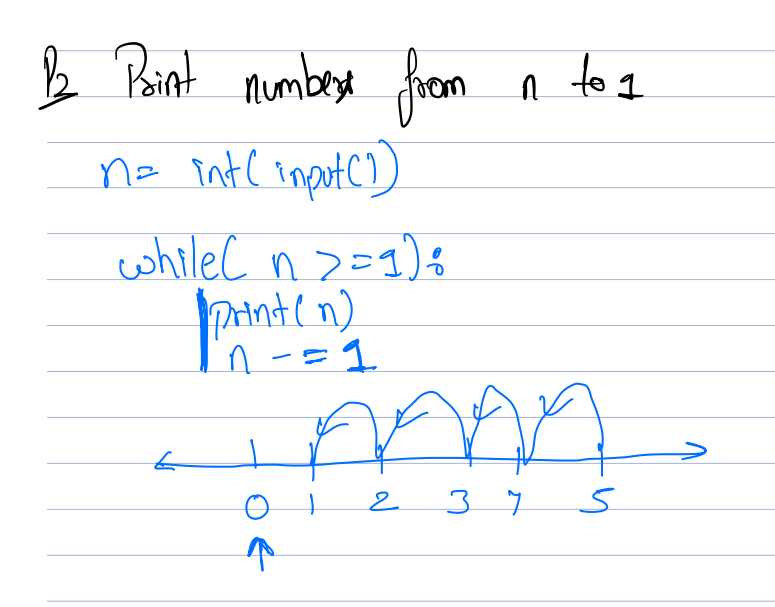
* An alternative way of writing this code is as follows:
```python
n = input()
count = 0
while count < n:
count += 1
print(count)
```
This is because counting in programming languages starts from `0`. Array indexing in most of the languages also starts from `0`. This is doing the same thing except the statements are shuffled.
---
## Print number from n to 1
### Example 2 - Print Number From n to 1
* Go grab your notebook, iPad, or laptop try writing code for the above question, and put the solution in the chat section.
* Writing in a book is best practice.
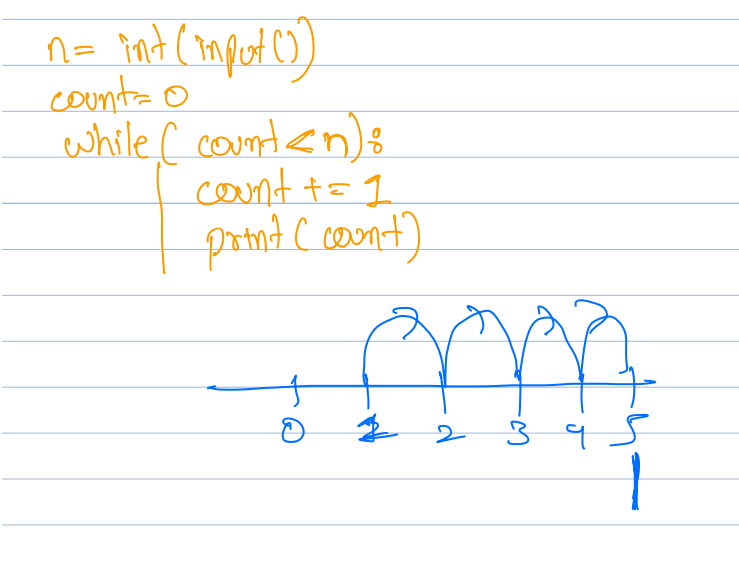
```python
n = int(input())
while n >= 1:
print(n)
n -= 1
```
* Dry run for n = 5
---
## Print even numbers from 1 to 100
### Example 3 - Print Even Numbers From 1 to 100
* Once done paste it into the chat section
**Note:** Don't forget the updation of a variable. Also, some of the solutions have conditions where the loop doesn't run at all.
```python
n = int(input())
count = 1
while count <= n:
if count % 2 == 0:
print(count)
count += 1
```
* Write the updation statement in the beginning only.
**Alternative Solution:**
In each interaction, we can update the count by 2. Initially, instead of starting from 1, we can start from 2, and in each iteration, we can do `count += 2` this will always result in an even number.
```python
n = int(input()):
count = 2
while count <= n:
print(count)
count += 2
```
This is an optimization of the above code as we are not checking the condition as well as the loop will only run half the times of `n`.
---
## Print the sum of all even numbers from 1 to 20
### Example 4 - Print the Sum of All Even Numbers From 1 to 20
We already know how to generate even numbers between `1` to `20`.
Instead of printing it, we need to store it in the bucket.
So we can keep adding these to a number and return the sum at the end.
```python
sum = 0
count = 2
while(count <= n):
sum += count
count += 2
print(sum)
```
---
## Print the digits of number `459`
### Example (VVIMP) - Print the Digits of Number 459 (order Doesn't Matter)
* How to get digits of a number in iteration
* Scraper -> extracts the last digit
* Scissors -> Cuts the last digit
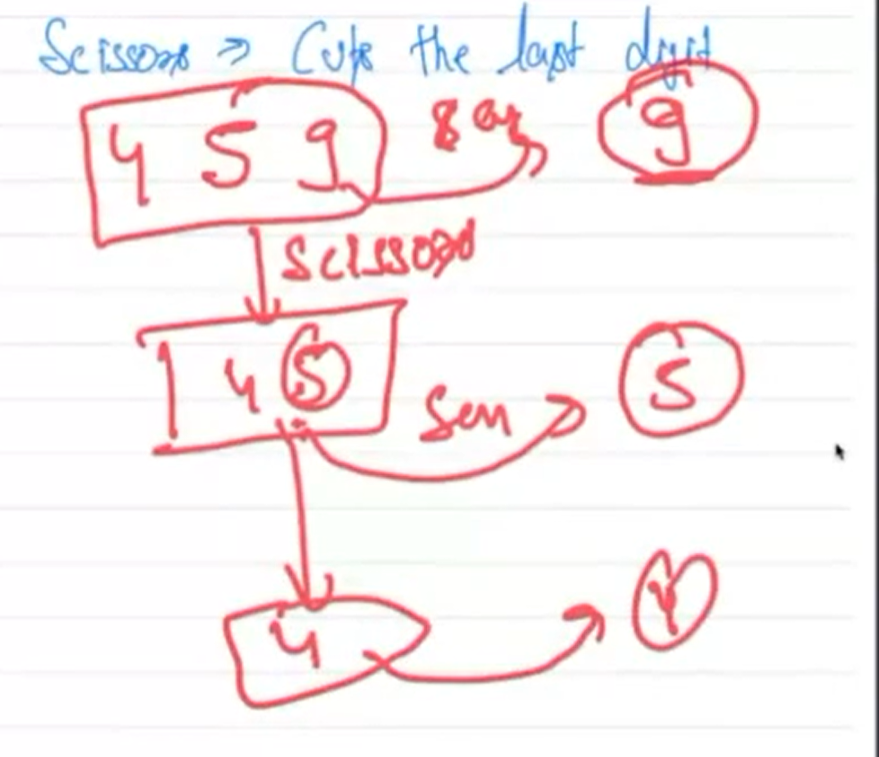
We will scrape the last digit, print the result, and cut the last digit. This process is continued until all the digits are cut. This is a loop, right?
Is there any operation I told you in the past which takes `459` and returns `9`?
* taking `% 10` (modulo 10) will return the last digit.
* `459 % 10 -> 9`
* `45 % 10 -> 5`
* `4 % 10 -> 4`
Is there any operation that takes `459` and returns `45`, basically cutting the last digit?
* taking `/ 10` (integer division by 10) will return the last digit.
* `int(459 / 10) -> 45`
* `int(45 / 10) -> 4`
* `int(4 / 10) -> 0`
Only division will give the floor value such as `45.9`. Also, `459 // 10` doesn't work with negative integers as `-459` will give `-45.9 -> -46`. Thus, we can simply use `int(val)` to get the integer part of the remaining number.
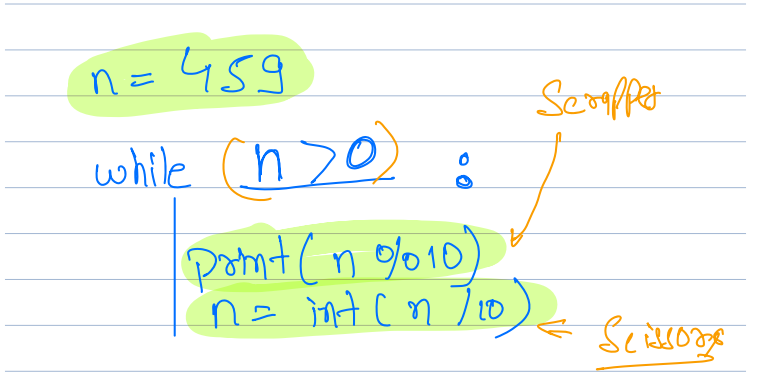
```python
n = int(input())
while n > 0:
print(n % 10)
n = int(n / 10)
```
---
### Question
What is the output of the following?
```python
print(149 % 10)
```
**Choices**
- [ ] 14
- [x] 9
- [ ] 1
- [ ] 0
---
## Break and Continue Statements
### Break Statement
**Note:** Only for loops
If you want to break out of the loop if a certain condition is met then you use `break`. It will break the entire loop and execute the next statement.
**Definition** Whenever a break is executed inside a loop, it terminates the loop.
What will be the output of the following code?
```python
count = 1
while count <= 100:
if count == 4:
break
print(count, end=" ")
count += 1
```
**Output**
```plaintext
1 2 3
```
### Continue Statement
**Note:** Only for loops
**Definition** It skips the inside loop and continues the loop's execution.
```python
count = 1
while count <= 10:
count += 1
if count == 4:
continue
print(count, end=" ")
```
**Output**
```plaintext
1 2 3 5 6 7 8 9 10 11
```
* The continue statement simply skips the rest of the instructions of the current interaction and begins with the next iteration.
Look at the example below:
```python
count = 1
while count <= 10:
if count == 4:
continue
print(count, end=" ")
count += 1
```
* This will end up in an infinite loop. As the updation condition is never performed due to continue statment. So once it reaches 4, it keeps looping on 4.
---
## While-else
* Only and only in Python
* Else block will run only after the loop successfully terminates without a break.
```python
count = 1
while count <= 100:
if count == 4:
break
print(count, end=" ")
count += 1
else:
print("Yayy!")
```
* It will not print `Yayy!` as it is terminated via a `break` statement rather than terminating naturally.
---
## Check whether a number is prime or not
### Example - Check Whether a Number is Prime or Not
* Prime number is only divisible by `1` or the number itself.
* One is neither prime not consonant.
* We can say that `a` is divisible by `n` if `a % n == 0`.
* We can say that `24` is not prime as `24` divides `2, 4, 6, 8, etc.`
* We can say that `23` is a prime number cause it only divides `1` and `23`.
* Write a code to check if the number is prime or not. Start a loop from `2` to `n-1` if it is dividing any number then return `not prime` else `prime`. We are not required to use `break`, `continue`, or `while else`.
**Solution 1:**
Let us say our number is `25`.
We will use a variable `flag` to store whether a number is prime or not. It is simply a boolean variable initialized with `false`.
As soon as the number is divisible by some other number we can change its value to `true` and it is not prime. If the number is not divisible by any other number the `flag` remains `false` and we can conclude that it is a prime number.
```python
n = int(input())
count = 2
flag = False
while count < n:
if n % count == 0:
flag = True
count += 1
if flag:
print("Not Prime")
else:
print("Prime")
```
**Solution 2:**
* Is not very different from the previous solution.
* Now consider if the number is `9`, it is divisible by `3`. Do we need to check for other numbers? We don't! If the given number is divisible by any other number, we can break from the loop and declare that it is prime.
* This is a great situation where we can use `break`.
```python
n = int(input())
count = 2
flag = False
while count < n:
if n % count == 0:
flag = True
break
count += 1
if flag:
print("Not Prime")
else:
print("Prime")
```
**Solution 2:**
* We can remove the flag. We can use the `while else` statement.
* Instead of checking the flag, we can say that if we didn't break from the loop, it is a prime number.
* So as soon as we encounter that the number is divisible by some other number we print it is not prime. In the else part we print it is prime.
```python
n = int(input())
i = 2
while i < n:
if n % i == 0:
print("not prime")
break
i += 1
else:
print("prime number")
```
---
### Question
When can we say a number A is divisible by n?
**Choices**
- [x] A % n == 0
- [ ] A / n == 0
- [ ] A // n == 0
- [ ] A % n != 0
---
### Question
What is the output of the following?
```python
count = 1
while(count <= 5):
if(count == 2):
break
print(count, end = ' ')
count += 1
```
**Choices**
- [ ] 1 3 4 5
- [x] 1
- [ ] 1 2
- [ ] 0 1
---
### Question
What is the output of the following?
```python
count = 1
while(count <= 5):
if(count == 3):
continue
print(count, end = ' ')
count += 1
```
**Choices**
- [ ] 1 2 3 4 5
- [ ] 1 2 4
- [ ] 0 1 2 4 5
- [x] Infinite Loop
 Sign in with Wallet
Connect another wallet
Sign in with Wallet
Connect another wallet