# Refresher: List 1
## Defining a List
### Definition
A list is a built-in data type that represents an ordered collection of items. It is a mutable, dynamic array, meaning you can modify its elements and size after creation.
### Syntax
```python
my_list = [element1, element2, element3, ...]
```
### Examples
- The provided code snippets demonstrate various aspects of working with lists in Python.
**Code 1**:
```python
a = [1, 2, 3]
```
- Initializes a list `a` with three integer elements.
**Code 2**:
```python
a = [1, "a"]
```
- Initializes a list `a` with two elements: an integer `1` and a string `"a"`.
**Output 2**:
```plaintext
# SyntaxError: closing parenthesis '}' does not match opening parenthesis '['
a = [1, "a"]
```
- This part of the code seems incomplete and might be causing a syntax error. The specific error is related to unmatched parentheses.
**Code 3**:
```python
a = ["a", 1, 3.14, True] # Lists can be heterogeneous
```
- Demonstrates that lists in Python can contain elements of different data types.
**Code 4**:
```python
a = list(range(10))
print(a)
```
**Output 4**:
```plaintext
[0, 1, 2, 3, 4, 5, 6, 7, 8, 9]
```
- Uses the `list()` constructor to create a list containing elements from `0` to `9` (result of `range(10)`).
**Code 5**:
```python
students = ['Kusum', 'Shubham', 'Pooja']
print(students)
```
**Output 5**:
```plaintext
['Kusum', 'Shubham', 'Pooja']
```
- Prints the list of student names.
### Indexing in a List
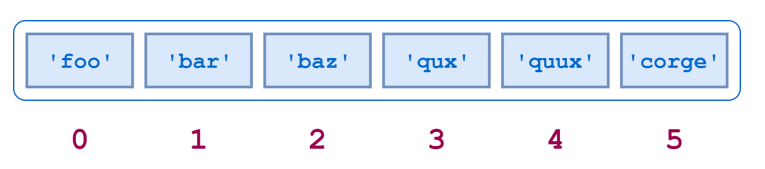
**Code**:
```python
print(students[1])
```
**Output**:
```plaintext
Shubham
```
**Code**:
```python
print(students[5])
```
**Output**:
```plaintext
# IndexError: list index out of range
```
**Explanation**:
- Accessing elements in a list using indices.
- An IndexError occurs when trying to access an index beyond the list's length.
### Reverse Indexing
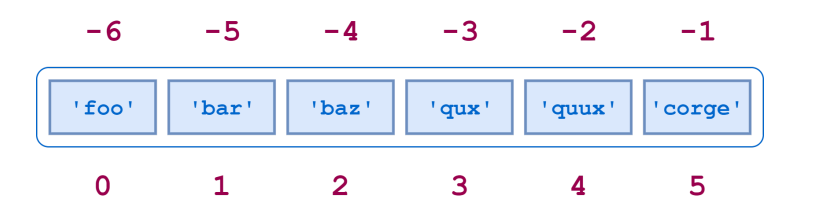
**Code**:
```python
students = ['Kusum', 'Shubham', 'Pooja']
print(students[-1])
```
**Output**:
```plaintext
Pooja
```
**Code**:
```python
students = ['Kusum', 'Shubham', 'Pooja']
print(students[-100])
```
**Output**:
```plaintext
# IndexError: list index out of range
```
### Updating an Index in A List
```python
students = ['Kusum', 'Shubham', 'Pooja']
print(students)
```
**Output**:
```python
['Kusum', 'Shubham', 'Pooja']
```
- Updating user at index 3
**Code**:
```python
students[3] = 'Ruben'
print(students)
```
**Output**:
```python
['Kusum', 'Shubham', 'Pooja', 'Ruben']
```
**Code**:
```python
students[-100]
```
**Output**:
```python
# IndexError: list index out of range
```
**Code**:
```python
print(type(students))
```
**Output**:
```python
<class 'list'>
```
- Print even numbers till 10
**Code**:
```python
a = list(range(0, 11, 2))
print(a)
```
**Output**:
```python
[0, 2, 4, 6, 8, 10]
```
- Print first 10 even numbers
**Code**:
```python
a = list(range(0, 20, 2))
print(a)
```
**Output**:
```python
[0, 2, 4, 6, 8, 10, 12, 14, 16, 18]
```
**Explanation**:
- Lists can be modified by assigning new values to specific indices.
- Negative indices count from the end of the list.
### Iteration in a List
```python
students = ['Kusum', 'Shubham', 'Pooja', 'Ruben', 'Aarushi', 'Vinoth', 'Veerendra']
```
- `len()` gives you the number of elements in a list
**Code**:
```python
print(len(students))
```
**Output**:
```python
7
```
**Code**:
```python
# Solution 1
n = len(students)
for i in range(0, n):
print(students[i])
```
**Output**:
```python
Kusum
Shubham
Pooja
Ruben
Aarushi
Vinoth
Veerendra
```
**Code**:
```python
# Solution 2
for student in students:
print(student)
```
**Output**:
```python
Kusum
Shubham
Pooja
Ruben
Aarushi
Vinoth
Veerendra
```
### Quiz 1
**Code**:
```python
# quiz
li = [-1, 0, 4]
for i in li:
if i > 0:
print(i, end=' ')
```
**Output**:
```python
4
```
**Explanation**:
- Iterating through a list and printing positive numbers.
### Functions in a List
### len()
- Returns the number of elements in a list.
**Code**:
```python
a = list(range(2, 6))
print(len(a))
```
**Output**:
```plaintext
4
```
### append()
- Appends an object to the end of the list.
**Code**:
```python
students = ['Kusum', 'Shubham', 'Pooja', 'Ruben', 'Aarushi', 'Vinoth', 'Veerendra']
students.append('Vicky')
print(students)
```
**Output**:
```plaintext
['Kusum', 'Shubham', 'Pooja', 'Ruben', 'Aarushi', 'Vinoth', 'Veerendra', 'Vicky']
```
**Code**:
```python
a = []
a.append('Hi')
print(a)
```
**Output**:
```plaintext
['Hi']
```
### insert()
- The `insert` method is used to insert an element before the specified index in a list.
**Code**:
```python
a = [1, 2, 3, 4]
a.insert(1, 'Aakar')
print(a)
```
**Output**:
```plaintext
[1, 'Aakar', 2, 3, 4]
```
**Explanation**:
- The element 'Aakar' is inserted at index 1, shifting the original elements to the right.
**Code**:
```python
a = [1, 2, 3, 4]
a.insert(-3, 'Aakar')
print(a)
```
**Output**:
```plaintext
[1, 'Aakar', 2, 3, 4]
```
**Explanation**:
- The negative index `-3` is interpreted as counting from the end of the list, so 'Aakar' is inserted at index 2 from the end.
**Code**:
```python
a = [1, 2, 3, 4]
a.insert(100, 'Aakar')
print(a)
```
**Output 3**:
```plaintext
[1, 2, 3, 4, 'Aakar']
```
**Explanation**:
- If the specified index is greater than the length of the list, the element is inserted at the end.
**Code**:
```python
a = [1, 2, 3, 4]
a.insert(-100, 'Aakar')
print(a)
```
**Output**:
```plaintext
['Aakar', 1, 2, 3, 4]
```
**Explanation**:
- The negative index `-100` is interpreted as counting from the end of the list, so 'Aakar' is inserted at the beginning of the list.
### pop()
- Removes and returns an item at the specified index (default last).
- Raises `IndexError` if the list is empty or the index is out of range.
**Code**:
```python
students = ['Kusum', 'Shubham', 'Pooja', 'Ruben', 'Aarushi', 'Vinoth', 'Veerendra']
print(students.pop())
print(students)
```
**Output**:
```plaintext
Veerendra
['Kusum', 'Shubham', 'Pooja', 'Ruben', 'Aarushi', 'Vinoth']
```
**Code**:
```python
a = [1, 2, 3, 4]
print(a.pop(5))
print(a)
```
**Output**:
```plaintext
# IndexError: pop index out of range
```
**Code**:
```python
a = []
print(a.pop())
print(a)
```
**Output**:
```plaintext
# IndexError: pop from an empty list
```
**Explanation**:
- The `pop()` function removes and returns an item at a specified index.
- Raises an `IndexError` if the index is out of range.
### remove()
- Removes the first occurrence of a value.
- Raises `ValueError` if the value is not present.
**Code**:
```python
students = ['Kusum', 'Shubham', 'Pooja', 'Ruben', 'Aarushi', 'Vinoth', 'Veerendra']
students.remove('Shubham')
print(students)
```
**Output**:
```plaintext
['Kusum', 'Pooja', 'Ruben', 'Aarushi', 'Vinoth', 'Veerendra']
```
**Code**:
```python
a = [1, 2, 3, 2, 4]
a.remove(2)
print(a)
```
**Output**:
```plaintext
[1, 3, 2, 4]
```
**Code**:
```python
a = [1, 2, 3, 4]
a.remove(5)
print(a)
```
**Output**:
```plaintext
# ValueError: list.remove(x): x not in the list
```
**Explanation**:
- The `remove()` function removes the first occurrence of a specified value.
- Raises a `ValueError` if the value is not present.
### Quiz
### Quiz 1
```python
li = [1, 2, 3]
li.append('4')
print(li)
```
**Answer**: [1, 2, 3, '4']
### Quiz 2
```python
li = []
print(len(li))
```
**Answer**: 0
### Quiz 3
```python
li = [1, 2]
print(li.pop())
```
**Answer**: 2
### Quiz 4
```python
li = [1, 3, 4]
li.insert(0, 2)
print(li)
```
**Answer**: [2, 1, 3, 4]
### Quiz 5
```python
li = [1, 2]
print(li.remove(2))
```
**Answer**: None
## Reverse
**Code**:
```python
a = [1, 2, 3]
print(a.reverse())
print(a)
```
**Output**:
```plaintext
[3, 2, 1]
```
**Code**:
```python
a = []
print(a.reverse())
print(a)
```
**Output**:
```plaintext
None
[]
```
**Explanation**:
- The `reverse()` method reverses the elements of a list in place.
## + operator
- Concatenating two lists.
- Creates a new list.
**Code**:
```python
a = [1, 2, 3]
b = [4, 5, 6]
c = a + b
print(c)
print(a)
print(b)
```
**Output**:
```plaintext
[1, 2, 3, 4, 5, 6]
[1, 2, 3]
[4, 5, 6]
```
### extend()
- Extend list by appending elements from the iterable.
**Code**:
```python
a = [1,2,3]
b = [4,5,6]
a.append(b)
print(a)
print(a[-1]) # not what we want
```
**Output**:
```plaintext
[1, 2, 3, [4, 5, 6]]
[4, 5, 6]
```
**Explanation**:
- The append() method is used, but it appends the entire list b as a single element at the end of list a.
**Code**:
```python
a = [1,2,3]
b = [4,5,6]
a.extend(b)
print(a)
print(b)
print(a[-1]) # not what we want
```
**Output**:
```plaintext
[1, 2, 3, 4, 5, 6]
[4, 5, 6]
6
```
**Explanation**:
- The extend() method is used, adding each element from list b individually to the end of list a.
**Code**:
```python
a = [1,2,3]
a.extend(a)
print(a)
```
**Output**:
```plaintext
[1, 2, 3, 1, 2, 3]
```
**Explanation**:
- The extend() method is used to add elements of list a to the end of list a, effectively doubling its content.
## in Operator
- return True or False after searching list
**Code**:
```python
students = ['Kusum', 'Shubham', 'Pooja', 'Ruben', 'Aarushi', 'Aakar', 'Veerendra']
print('Aakar' in students)
print('Kusum' in students)
```
**Output**:
```plaintext
False
True
```
**Explanation**:
- The `in` operator is used to check if an element is present in a list.
- The first print statement checks if 'Aakar' is in the list of students, resulting in `False`.
- The second print statement checks if 'Kusum' is in the list of students, resulting in `True`.
### How to take List as Input?
**Code**:
```python
n = int(input())
a = []
for i in range(n):
item = input()
a.append(item)
print(a)
```
**Output**:
```plaintext
5
a
b
c
d
e
['a', 'b', 'c', 'd', 'e']
```
**Explanation**:
- The code takes an integer `n` as input, then uses a loop to take `n` input items and appends them to a list `a`, resulting in a list of items.
## Split
**Code**:
```python
s = 'I-love-bananas'
li = s.split('-')
print(li)
print(type(li))
```
**Output**:
```plaintext
['I', 'love', 'bananas']
<class 'list'>
```
**Explanation**:
- The `split` method is used to split a string `s` into a list of substrings based on the specified delimiter ('-'), creating a list `li`.
**Code**:
```python
s = 'I--love--bananas'
li = s.split('--')
print(li)
print(type(li))
```
**Output**:
```plaintext
['I', 'love', 'bananas']
<class 'list'>
```
**Explanation**:
- Even if there are multiple consecutive delimiters, `split` correctly handles them and produces the desired list.
**Code**:
```python
n = int(input())
s = input() # always returns string "a b c d e"
li = s.split(' ')
print(li)
```
**Output**:
```plaintext
5
a b c d e
['a', 'b', 'c', 'd', 'e']
```
**Explanation**:
- The code takes an integer `n` and a space-separated string as input, then uses `split` to create a list `li` of individual items.
**Code**:
```python
# INPUT
# 5
# 12 14 15 16 17
n = int(input())
s = input() # always returns string "a b c d e"
li = s.split(' ')
new_li = []
for item in li:
new_li.append(int(item))
print(new_li)
```
**Output**:
```plaintext
5
1 2 3 4 5
[1, 2, 3, 4, 5]
```
**Explanation**:
- The code converts a space-separated string of numbers into a list of integers, demonstrating the use of `split` and conversion to integers.
**Code**:
```python
# INPUT
# 5
# 12 14 15 16 17
n = int(input())
s = input() # always returns string "a b c d e"
li = s.split(' ')
for index in range(len(li)):
li[index] = int(li[index])
print(li)
```
**Output**:
```plaintext
5
1 2 3 4 5
[1, 2, 3, 4, 5]
```
**Explanation**:
- Similar to the previous example, this code converts a space-separated string of numbers into a list of integers using a loop.**Explanation**:
### Problem
Given a List of Student Marks, Count the Number of Student Who Failed
:::info
Please take some time to think about the solution approach on your own before reading further.....
:::
**Code**:
```python
n = int(input())
s = input() # always returns string "a b c d e"
marks = s.split(' ')
for index in range(len(marks)):
marks[index] = float(marks[index])
print(marks)
# ------------------------
count = 0
for index in range(len(marks)):
if marks[index] <= 30:
count += 1
print(count)
```
**Output**:
```plaintext
5
10 20 30 40 50
[10.0, 20.0, 30.0, 40.0, 50.0]
3
```
**Explanation**:
- The code first takes an integer `n` as input, representing the number of students. Then, it takes a string `s` as input, which contains space-separated marks of students in the form of "a b c d e".
- The string of marks is split into a list of strings using the `split` method, and then each element in the list is converted to a floating-point number using a loop.
- The list of marks is printed as output.
- The code initializes a variable `count` to 0 and then iterates through the list of marks. For each mark, if it is less than or equal to 30, the `count` is incremented.
- Finally, the count of students who failed (marks <= 30) is printed as output.
**Output Explanation**:
- For the given input "5" and "10 20 30 40 50", the list of marks after conversion to float is `[10.0, 20.0, 30.0, 40.0, 50.0]`.
- Among these marks, three students have marks less than or equal to 30 (10.0, 20.0, and 30.0). Therefore, the count of students who failed is printed as `3`.
 Sign in with Wallet
Connect another wallet
Sign in with Wallet
Connect another wallet