# Refresher: Sets and Dictionaries
## Content covered till now
1. Data Types
2. Operators
3. Loops
4. Functions
5. List
6. Tuples
7. String
8. Sets & Dictionaries (today)
---
### Question
What is the output of the following?
```python
a = [1, 2, 3, 4, 5]
print('|'.join(a))
```
**Choices**
- [ ] 1|2|3|4|5
- [x] Error
- [ ] |1|2|3|4|5|
**Explanation**
```python
a = [1, 2, 3, 4, 5]
print('|'.join(a))
```
`join()` takes an iterable of string but here we are giving an iterable of integer so it will give us an error.
**Output:**
```plaintext
TypeError Traceback (most recent call last)
Cell In[5], line 2
1 a = [1, 2, 3, 4, 5]
----> 2 print('|'.join(a))
TypeError: sequence item 0: expected str instance, int found
```
---
### Question
What is the output of the following?
```python
a = 'scaler123'
print(a.isaplha())
```
**Choices**
- [ ] True
- [x] False
**Explanation**
```python
a = 'scaler123'
print(a.isaplha())
```
The output will be false as `scaler123` does not have only alphabets it also has numbers.
---
### Question
What is the output of the following?
```python
a = 'scaler123'
print(a.endswith('ler'))
```
**Choices**
- [ ] True
- [x] False
---
## Introduction to Dictionary
In other languages dictionary is also known as a map.
The dictionary is basically a place where we have words with their meanings.
And every word in the dictionary is unique, but it is not necessary that two can not have the same meaning.
**Properties of dictionary**
* Stores key-value pair.
* Key is unique, value may or may not be unique
* Dictionary is an iterable.
* Dictionary has key and value, both keys and values are iterable.
* Dictionary is mutable, which means we can change the dictionary after defining it.
* Python dictionaries are not ordered.
* Python dictionaries are heterogeneous.
* The key needs to be an immutable data type.
### Initialization
The dictionary can be initialized in two ways:
- Using `{}`.
- Using `dict()`, it takes a list of iterables and converts them to the dictionary.
**Example:**
```python
d = {} # empty dictionary
print(d)
print(type(d))
```
**Output:**
```plaintext
{}
<class 'dict'>
```
**Example:**
```python
d = dict() # empty dictionary
print(d)
print(type(d))
```
**Output:**
```plaintext
{}
<class 'dict'>
```
We are just making an example dictionary using `{}`, and we can **print a dictionary by just its name**.
**Example:**
```python
d = {'a': 1, 'b': 1}
print(d)
```
**Output:**
```plaintext
{'a': 1, 'b': 1}
```
If we try to store duplicate keys then the previous value of the key will be overridden.
**Example:**
```python
d = {'a': 1, 'a': 10}
print(d)
```
**Output:**
```plaintext
{'a': 10}
```
**Dictionary can't have mutable keys,** we can have a tuple as a key, but we can't use a list, set, or dictionary as a key.
**Example:**
```python
a = {[1,2,3]: 'abc'} # can't have mutable keys.
```
**Output:**
```plaintext
TypeError Traceback (most recent call last)
Cell In[37], line 1
----> 1 a = {[1,2,3]: 'abc'} # can't have immutable keys.
TypeError: unhashable type: 'list'
```
The below code will work, as we can use the tuple as a key.
**Example:**
```python
a = {(1,2,3): 'abc'} # can't have mutable keys.
```
**Example:**
```python
nicknames = {
"Madhuri": "Sweety",
"Vinoth": "Appu",
"Shubham": "Zoo Zoo",
"Kusum": "ku ku",
"Aakar": "Golu"
}
print(type(nicknames))
print(nicknames)
```
**Output:**
```plaintext
<class 'dict'>
{'Madhuri': 'Sweety', 'Vinoth': 'Appu', Shubham': 'Zoo Zoo', 'Kusum': 'ku ku', 'Aakar': 'Golu'}
```
**Python dictionaries are not ordered,** all the elements in the dictionary will be inserted at any random position, so we cannot get values by indexes in the dictionary.
**Example:**
```python
nicknames = {
"Madhuri": "Sweety",
"Vinoth": "Appu",
"Shubham": "Zoo Zoo",
"Kusum": "ku ku",
"Aakar": "Golu"
}
# Indexing
# Dont have indexing
print(nicknames[0])
```
**Output:**
```plaintext
KeyError Traceback (most recent call last)
Cell In[18], line 4
1 # Indexing
2
3 # Dont have indexing
----> 4 print(nicknames[0])
KeyError: 0
```
**Accessing value from the dictionary using a key.**
**Example:**
```python
nicknames = {
"Madhuri": "Sweety",
"Vinoth": "Appu",
"Shubham": "Zoo Zoo",
"Kusum": "ku ku",
"Aakar": "Golu"
}
# Get value
print(nicknames['Madhuri'])
```
**Output:**
```plaintext
Sweety
```
If the key does not exist in the dictionary, then we will get an error.
**Example:**
```python
nicknames = {
"Madhuri": "Sweety",
"Vinoth": "Appu",
"Shubham": "Zoo Zoo",
"Kusum": "ku ku",
"Aakar": "Golu"
}
# Get value
print(nicknames['Manish'])
```
**Output:**
```plaintext
KeyError Traceback (most recent call last)
Cell In[20], line 1
----> 1 print(nicknames['Manish'])
KeyError: 'Manish'
```
The `get()` method is also used to get the key value, and if the key does not exist it will not give an error, then it will simply print `None`.
**Example:**
```python
nicknames = {
"Madhuri": "Sweety",
"Vinoth": "Appu",
"Shubham": "Zoo Zoo",
"Kusum": "ku ku",
"Aakar": "Golu"
}
print(nicknames.get('Vicky'))
```
**Output:**
```plaintext
None
```
We can also the value which will be displayed if the key does not exist, as in the below key `Manish` does not exist in the dictionary, so `Oye` will be printed.
**Example:**
```python
nicknames = {
"Madhuri": "Sweety",
"Vinoth": "Appu",
"Shubham": "Zoo Zoo",
"Kusum": "ku ku",
"Aakar": "Golu"
}
print(nicknames.get('Manish', 'Oye'))
```
**Output:**
```plaintext
Oye
```
But if a key exists in the dictionary then its value will be printed.
**Example:**
```python
nicknames = {
"Madhuri": "Sweety",
"Vinoth": "Appu",
"Shubham": "Zoo Zoo",
"Kusum": "ku ku",
"Aakar": "Golu"
}
print(nicknames.get('Madhuri', 'Oye'))
```
**Output:**
```plaintext
Sweety
```
**Dictionary are heterogeneous in Python,** means we can store different data type keys and values in a single dictionary.
**Example:**
```python
# Showing the heterogeneous nature of dict
a = {True: 'a', 'a': 1, 2: False, 3.14: 'pi'}
print(a)
```
**Output:**
```plaintext
{True: 'a', 'a': 1, 2: False, 3.14: 'pi'}
```
### insert
We can simply assign a value for a new key.
The below code will add a key `Manish` with the value `Monu` in the dictionary `nicknames`.
**Example:**
```python
# Insert
nicknames['Manish'] = 'Monu'
print(nicknames)
```
**Output:**
```plaintext
{'Madhuri': 'Sweety', 'Vinoth': 'Appu', 'Shubham': 'Zoo Zoo', 'Kusum': 'ku ku', 'Aakar': 'Golu', 'Manish': 'Monu'}
```
Now if we try to get the `Manish` value, then its value will be printed as it is now available in the dictionary.
**Example:**
```python
print(nicknames.get('Manish', 'Oye'))
```
**Output:**
```plaintext
Monu
```
### update
We can simply assign a new value for a key.
The below code will update the value of key `Kusum`.
**Example:**
```python
# Update
nicknames['Kusum'] = 'Ku Ku'
print(nicknames)
```
**Output:**
```plaintext
{'Madhuri': 'Sweety', 'Vinoth': 'Appu', 'Shubham': 'Zoo Zoo', 'Kusum': 'Ku Ku', 'Aakar': 'Golu', 'Manish': 'Monu'}
```
**In dict, you can't update the keys. If you want to update a key, delete the old one and add a new one.**
### Length of a Dictionary
`len()` will print the length of the dictionary, and it will print a number of key-value pairs of the dictionary.
**Example:**
```python
# Length of a dictionary - Number of keys, value pair.
print(len(nicknames))
```
**Output:**
```plantext
6
```
### delete
We can delete the key in two ways:
- using `pop()`.
- using `del`.
**Deletion using pop():**
We can give the key and default value to the `pop()`, it will delete the key, if the key is present then it will return its value from the dictionary, otherwise, it will return the default value.
If the key is not present in the dictionary and if the default value is not also provided then it will give a `keyError`.
**Example:**
```python
print(nicknames.pop('AAkar'))
```
**Output:**
```plantext
KeyError Traceback (most recent call last)
Cell In[39], line 3
1 # Delete
2 # type 1
----> 3 print(nicknames.pop('AAkar'))
KeyError: 'AAkar'
```
As we have given a non-existing key and also not provided the default value, it will give an error.
**Example:**
```python
print(nicknames.pop('AAkar', 'Oye'))
```
**Output:**
```plantext
Oye
```
The above key does not exist, but we have provided the default value, so it will return the default value.
**Example:**
```python
print(nicknames)
```
**Output:**
```plantext
{'Madhuri': 'Sweety', 'Vinoth': 'Appu', 'Shubham': 'Zoo Zoo', 'Kusum': 'Ku Ku', 'Aakar': 'Golu', 'Manish': 'Monu'}
```
If a key exists in the dictionary, then it will be deleted from the dictionary and its value will be returned.
**Example:**
```python
print(nicknames.pop('Aakar', 'Oye'))
print(nicknames)
```
**Output:**
```plantext
Golu
{'Madhuri': 'Sweety', 'Vinoth': 'Appu', 'Shubham': 'Zoo Zoo', 'Kusum': 'Ku Ku', 'Manish': 'Monu'}
```
**Deletion using del:**
`del` can be used for deleting the key from the dictionary.
**Example:**
```python
nicknames['Aakar'] = 'Golu'
del nicknames['Aakar']
print(nicknames)
```
**Output:**
```plantext
{'Madhuri': 'Sweety', 'Vinoth': 'Appu', 'Shubham': 'Zoo Zoo', 'Kusum': 'Ku Ku', 'Manish': 'Monu'}
```
The above code will delete key Aakar from the dictionary.
`del` only deletes the key but `pop()` will also return the value of the key after deleting it.
### Keys of Dictionary
The `key()` function is used to get all the keys of the dictionary.
**Example:**
```python
print(nicknames.keys())
```
**Output:**
```plaintext
dict_keys(['Madhuri', 'Vinoth', 'Shubham', 'Kusum', 'Manish'])
```
### Values of Dictionary
The `values()` function is used to get all values of the dictionary.
**Example:**
```python
print(nicknames.values())
```
**Output:**
```plaintext
dict_values(['Sweety', 'Appu', 'Zoo Zoo', 'Ku Ku', 'Monu'])
```
### Iterations in a Dictionary
Iterations are printing the key value of the dictionary but in different lines. We can iterate in two ways:
**Way 1:**
Iterating using the key of the dictionary.
**Example:**
```python
for key in nicknames.keys():
print(f"{key}'s nickname is {nicknames[key]}")
```
**Output:**
```plaintext
Madhuri's nickname is Sweety
Vinoth's nickname is Appu
Shubham's nickname is Zoo Zoo
Kusum's nickname is Ku Ku
Manish's nickname is Monu
```
**Way 2:**
Iterating using `items()`, will give both key-value pairs of the dictionary.
**Example:**
```python
for key, value in nicknames.items():
print(f"{key}'s nickname is {value}")
```
**Output:**
```plaintext
Madhuri's nickname is Sweety
Vinoth's nickname is Appu
Shubham's nickname is Zoo Zoo
Kusum's nickname is Ku Ku
Manish's nickname is Monu
```
## in
`in` is used to check whether the key is present in a dictionary or not.
**Example:**
```python
'Nafeesa' in nicknames
```
**Output:**
```plaintext
False
```
**Example:**
```python
'Kusum' in nicknames
```
**Output:**
```plaintext
True
```
We can not check the presence of value in a dictionary using the `in` operator.
**Example:**
```python
'Ku Ku' in nicknames
```
**Output:**
```plaintext
False
```
---
### Question
What is the output of the following?
```python=
a = {'a': 'A'}
print(type(a))
```
**Choices**
- [ ] str
- [ ] list
- [x] dict
- [ ] tuple
---
## Problem Statement Count frequency of characters
Given a string, count the number of characters used.
:::warning
Please take some time to think about the solution approach on your own before reading further.....
:::
### Explanation
Take a string as input, and print the frequencies of every unique character of the string.
### Test Cases
**Input:**
`input = 'Aakar Sharma'`
**Output:**
```plaintext
print
A - 1
a - 4
k - 1
r - 2
S - 1
' ' - 1
h - 1
m - 1
```
### Solution
We can create a dictionary to store every character as a key and frequency as a value, When we get a new character we store it with a frequency 1, and if the character is already present in the dictionary then we will simply increment its frequency by 1.
**Code 1:**
```python
s = input()
freq = {}
for char in s:
if(char in freq):
freq[char] += 1
else:
freq[char] = 1
print(freq)
```
**Output:**
```plaintext
Aakar Sharma
{'A': 1, 'a': 4, 'k': 1, 'r': 2, ' ': 1, 'S': 1, 'h': 1, 'm': 1}
```
**Code 2:**
```python
s = input()
freq = {}
for char in s:
freq[char] = freq.get(char, 0) + 1
print(freq)
```
**Output:**
```plaintext
Aakar Sharma
{'A': 1, 'a': 4, 'k': 1, 'r': 2, ' ': 1, 'S': 1, 'h': 1, 'm': 1}
```
---
### Question
What is the output of the following?
```python
d = {'a': 1, 'b': 2, 'c': 3}
print(d[1])
```
**Choices**
- [ ] a
- [ ] b
- [ ] None
- [x] KeyError
---
### Question
What is the output of the following?
```python
a = {'Scaler': 1}
a.pop('Scaler')
print(len(a))
```
**Choices**
- [ ] 1
- [x] 0
- [ ] None
- [ ] Error
---
## Sets
Sets are data structures which store unique elements.
**Properties of sets:**
* Sets are unordered, which means we can not use indexing.
* Sets are iterable
* Sets are heterogeneous, which means they can have any data type value.
* Sets should only contain immutable data types.
### Initialization
Sets are initialized using `{}`, and elements are separated by commas.
**Example:**
```python
# Initialization
a = {1, 2,3,1,2,3}
print(a)
print(type(a))
```
**Output:**
```plaintext
{1, 2, 3}
<class 'set'>
```
### Defining set using set()
`set()` is used to define a set, we can also define an empty set by `set()`, as `{}` will not work as an empty set, it will be considered as an empty dictionary.
**Example:**
```python
a = set()
print(type(a))
```
**Output:**
```plaintext
<class 'set'>
```
### Indexing Does Not Work in Set
As sets are unordered, so we cannot use indexing in the set.
**Example:**
```python
# Indexing
# Does not work, because sets are unordered.
colors = {'red', 'green', 'yellow'}
print(colors)
print(colors[0])
```
**Output:**
```plaintext
{'red', 'yellow', 'green'}
--------------------------------------------------------------------
-------
TypeError Traceback (most recent call last)
Cell In[70], line 6
4 colors = {'red', 'green', 'yellow'}
5 print(colors)
----> 6 print(colors[0])
TypeError: 'set' object is not subscriptable
```
### Insert
The `add()` function is used to add elements in the set.
**Example:**
```python
colors.add('black')
print(colors)
```
**Output:**
```plaintext
{'red', 'yellow', 'green', 'black'}
```
### Update
`update()` will not update the existing value of the set, it is simply used to add multiple values in the set, we can add iterables using `update()` in the set.
**Example:**
```python
# Update - just add many values
li = ['white', 'blue']
colors.update(li)
print(colors)
```
**Output:**
```plaintext
{'red', 'yellow', 'white', 'green', 'blue', 'black'}
```
### Deleting an Element from The Set
`remove()` is used for deleting an element from the set.
**Example:**
```python
# delete an item from a set
colors.remove('yellow')
print(colors)
```
**Output:**
```plaintext
{'red', 'white', 'green', 'blue', 'black'}
```
### Length
`len()` is used for getting the length of the set.
**Example:**
```python
# len
print(len(colors))
```
**Output:**
```plaintext
5
```
### Print/Iterate
We can iterate a set using a for loop.
**Example:**
```python
# Print/Iterate
for color in colors:
print(color)
```
**Output:**
```plaintext
red
white
green
blue
black
```
### in Operator
The `in` operator checks whether the element is present in a set or not.
**Example:**
```python
# in operator
'pink' in colors
```
**Output:**
```plaintext
False
```
### Use of Set
- For storing unique values, when we do not want to store frequency.
- Given a string, tell a number of unique characters of it.
---
## Intersection, Union and Difference
Let us assume we have two sets `A` and `B`,
- `A` represents `food_that_you_like_to_eat = {}`
- `B` represents `food_that_are_expensive = {}`
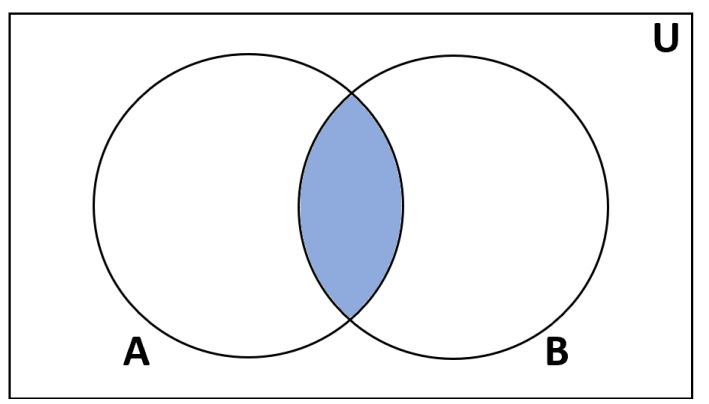
### Intersection
In sets `A` and `B`, there can be some food common, which you like to eat and which are expensive also.
Intersection represents a common area of both means foods that are expensive and you like also.
### Union
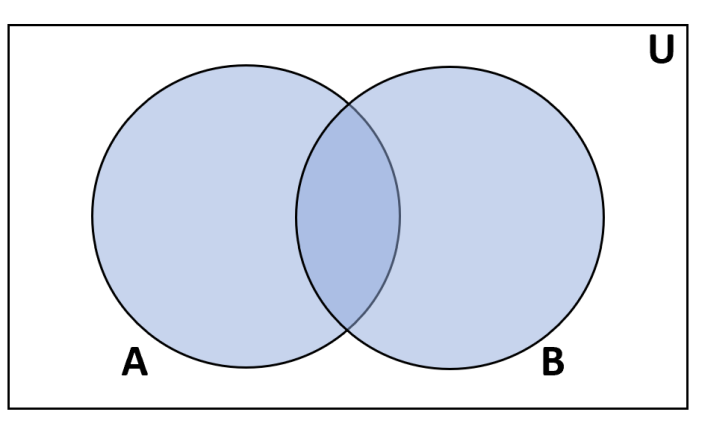
The union represents both the food that you like and the foods that are expensive.
Union is just a combination of both sets, but the intersection will not be repeated twice in union, it will be once only.
### Difference
`A - B` represents food that you like but is not expensive, which means we have subtracted `B` from `A`.
We can also find `B - A`, which represents food that are expensive but you don't like.
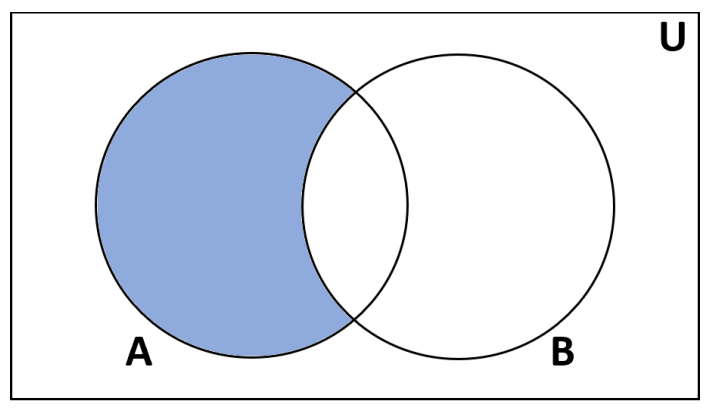
Intersection, Union and Difference will return set as output.
### Intersection, Union and Difference Example in Python
Let us create a set with data
**Code:**
```python
food_that_you_like_to_eat = {'Pizza', 'Noodles', 'Pasta', 'Chocolates', 'Burger'}
food_that_are_expensive = {'Pizza', 'Croissant', 'Avocado'}
```
So `Pizza` is the only which we like to eat and it is expensive also.
What are things that we like to eat but are not expensive, everything other than pizza will be the answer to this.
Things that are expensive and we don't like to eat are 'Croissant' and 'Avocado'.
**Intersection in Python:**
`intersection()` is used for finding intersection in Python.
**Example:**
```python
food_that_you_like_to_eat.intersection(food_that_are_expensive)
```
**Output:**
```plaintext
{'Pizza'}
```
**Union in Python:**
`union()` is used for finding union in Python.
**Example:**
```python
food_that_you_like_to_eat.union(food_that_are_expensive)
```
**Output:**
```plaintext
{'Avocado', 'Burger', 'Chocolates', 'Croissant', 'Noodles', 'Pasta', 'Pizza'}
```
**Difference in Python:**
`difference()` is used for finding difference in Python.
**Example:**
```python
food_that_you_like_to_eat.difference(food_that_are_expensive)
```
**Output:**
```plaintext
{'Burger', 'Chocolates', 'Noodles', 'Pasta'}
```
We can also find the difference between set by using the `-` symbol.
**Example:**
```python
food_that_you_like_to_eat - food_that_are_expensive
```
**Output:**
```plaintext
{'Burger', 'Chocolates', 'Noodles', 'Pasta'}
```
---
## Problem Statement: Count unique words
Given a sentence count the number of unique words.
:::warning
Please take some time to think about the solution approach on your own before reading further.....
:::
### Solution
1. We first take the sentence as input, and then we use `split()` to separate it from spaces.
2. Then we will add every separated word in a set.
3. At last we will print the size of the set.
**Code:**
```python
sentence = input()
words = sentence.split(' ')
s = set(words)
print(len(s))
print(s)
```
**Output:**
```plaintext
This is a sentence. This is not a paragraph.
6
{'sentence.', 'a', 'not', 'This', 'is', 'paragraph.'}
```
---
## Design a game FLAMES
### Design a game: FLAMES
F - Friends
L - Love
A - affair
M - marriage
E - enemy
s - sibling
We will take a girl's and a boy's name, and then we have to find the relationship between them.
### Rules
1. Find out all the unique characters in both names and remove the common characters of both names.
2. Add both the numbers and find out the respective character in FLAMES.
3. If the number is greater do round robin.
### Example:
**Input**
```plaintext
boy = 'aakar sharma'
girl = 'disha patani'
```
:::warning
Please take some time to think about the solution approach on your own before reading further.....
:::
**Solution:**
1. Find unique characters of both names.
- Here boy name has `akrshm` unique characters.
- Girl name has `dishaptn` unique characters
2. Now remove common characters of both, here `a`, `s` and `m` are common, so remove these from both.
- `krm`, now it has 3 characters
- `diptn`, it has 5 characters.
3. The sum of both is `3 + 5 = 8`.
4. `F -> 1`, `L -> 2`, `A -> 3`, `M -> 4`, `E -> 5`, `S -> 6`, then again we start from the first character of FLAMES, `F -> 7`, `L -> 8`.
5. So we have `L` at 8, **so aakar sharma is in Love with disha patani.**
---
### Question
What is the output of the following?
```python
a = {}
print(type(a))
```
**Choices**
- [ ] tuple
- [ ] list
- [x] dict
- [ ] set
---
### Question
What is the output of the following?
```python
l = [1, 1, 2, 2, 3, 3]
s = set(l)
print(len(s))
```
**Choices**
- [ ] 6
- [x] 3
- [ ] 2
- [ ] Error
---
### Question
What is the output of the following?
```python
a = {1, 2, 3}
b = {3, 4, 5}
print(a - b)
print(a.union(b))
print(a.intersection(b))
```
**Choices**
- [ ] [1, 2, 3, 4, 5]
[3]
[1, 2]
- [x] [1, 2]
[1, 2, 3, 4, 5]
[3]
- [ ] [3]
[1, 2]
[1, 2, 3, 4, 5]
- [ ] None of these
 Sign in with Wallet
Connect another wallet
Sign in with Wallet
Connect another wallet