# Refresher : Strings
# Introduction to String
---
## Explanation
Lets consider this following pseudo-code:
```java
System.out.print("Hello World")
```
The part ie "Hello World" is known as **string**.
String is defined as the sequence of characters.
Characters involves - [A - Z] , [a - z] , [0 - 9] , spaces, tabs, new line, **{@,#,$,...}**.
### Examples
* "abc123" - This is a string
* "abc $ - This is **not** a string, as this dont have ending double quotes.
* " 123 " - This is a string
* 123 - This is **not** a string. This is an integer
---
## String VS Integer
"123" is a string but `123` is an integer. On string we apply operations like concatanation, length ,etc. In integer, we apply addition, multiplication,etc.
The basic difference in string and integer is in the operations we do on them.
---
## String in Computers
### Explanation
The computers only understands binary, which is base 2. All the numbers which is base 10 is converted to binary so that computers understands it.
All the texts, pictures, audios , etc are similarly converted to numbers in computers.
Lets suppose we have a string "xyz" and in computer x is denoted by the number a, y is by b and z is by c. So we can say that "xyz" is represented by the number [ a b c].
But there is no inherent rule of mapping, all this is done by assumption, which creates a problem. So to make things uniform, ASCII standard is implemented.
---
## ASCII
### Explanation
ASCII, in full American Standard Code for Information Interchange, a standard data-encoding format for electronic communication between computers. ASCII assigns standard numeric values to letters, numerals, punctuation marks, and other characters used in computers.
The ASCII table looks like this:-
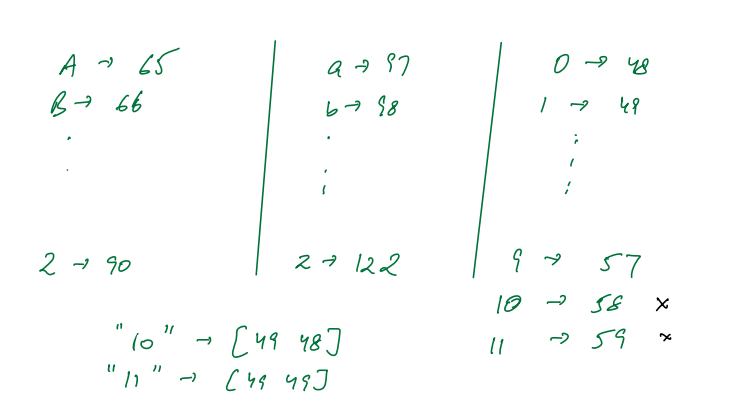
> The learners are not required to remember this.
---
## ASCII
### Explanation
Suppose we have a string:
```java
String country = "India";
```
We assume String is an array of characters, hence it is comprehended as:
```java
"India" -> ['I', 'n', 'd', 'i', 'a']
```
Length of string is given by
```java
str.length()
```
If we want to access the i-th character of the string, we use:
```java
str.charAt(index)
```
### Question - 1
Given a String, print its characters in new line
**Input:**
```java
String -> "India"
```
**Output:**
```plaintext
I
n
d
i
a
```
**Approach:** Iterate through each character in the string using a for loop and print it on a new
**Code:**
```java
for(int i = 0; i < country.length(); i++) {
System.out.println(country.charAt(i));
}
```
### Question - 2
Given a String, print the ASCII of its characters in new line
**Input:**
```java
String -> "India"
```
**Output:**
```plaintext
73
110
100
105
97
```
> Hint : Java understands characters as numbers
**Approach:** Iterate through each character in the string, cast it to an integer to get its ASCII value, and then print that value on a new line.
**Code:**
```java
String str = "India";
for(int i = 0; i < str.length(); i++) {
System.out.println((int)str.charAt(i));
}
```
### Question - 3
Given a String, print the count of upper-case characters
**Input:**
```java
String -> "kjRS78q31@3 Q"
```
**Output:** 3
> Hint 1 : A-Z = $65 - 90$
> Hint 2 : You don't need Hint 1
**Approach:** The approach iterates over each character of the string str. For each character, it checks if it falls within the ASCII range for uppercase letters ('A' to 'Z'). If so, it increments the counter cnt. At the end, the total count of uppercase characters is printed.
**Code:**
```java
int cnt = 0;
String str = "kjRS78q31@3 Q";
for(int i = 0; i < str.length(); i++) {
char c = str.charAt(i);
if(c >= 'A' && c <= 'Z') {
cnt++;
}
}
System.out.println("Count of uppercase chars is " + cnt);
```
### Question - 4
Given a String, print the count of special characters
**Input:**
```java
String -> "kjRS78q31@3 Q"
```
**Output:** 2
> Special Characters means non numeric
**Approach:** The code iterates over each character of the string str. For each character, it checks if it's neither a number, nor an uppercase letter, nor a lowercase letter (i.e., it's a special character). If so, it increments the counter cnt. The final count represents the number of special characters.
**Code:**
```java
public static int specialChars(String str) {
int cnt = 0;
for(int i = 0; i < str.length(); i++) {
char c = str.charAt(i);
if(
!(c >= '0' && c <= '9') &&
!(c >= 'A' && c <= 'Z') &&
!(c >= 'a' && c <= 'z')
) {
cnt++;
}
}
return cnt;
}
```
### Question - 5
Given a string, return the string in reverse
**Input:** : "Aarnav"
**Output:** "vanraA"
* **Approach 1:** For each character in the string (from front to back), prepend it to the result. This builds the reversed string from front to back.
```java
ans = ""
ans = 'A' + ans = 'A' + "" = "A"
ans = 'a' + ans = 'a' + "A" = "aA"
ans = 'r' + ans = 'r' + "aA" = "raA"
.
.
ans = 'v' + ans = 'v' + "anraA" = "vanraA"
```
* **Approach 2:** For each character in the string (from back to front), append it to the result. This builds the reversed string from back to front.
```java
ans = ""
ans = "" + 'v' = "v"
ans = "v" + 'a' = "va"
.
.
.
ans = "vanra" + 'A' = "vanraA"
```
**Code:**
```java
public static String reverse(String str) {
String ans = "";
for(int i = 0; i < str.length(); i++) {
ans = str.charAt(i) + ans;
}
return ans;
}
```
### Question - 6
Given a String, check whether its a palindrome
**Palindrome** - A string which reads the same from front and back
**Examples** - madam, maam, malayalam, dad, mom, racecar, nitin
> Hint: Re-use previous reverse code
**Approach:** Reverse the given string and compare it with the original. If they are identical, then the string is a palindrome.
**Code:**
```java
public static boolean isPalindrome(String str) {
String rev = reverse(str);
if (str.equals(rev)) {
return true;
} else {
return false;
}
}
```
 Sign in with Wallet
Connect another wallet
Sign in with Wallet
Connect another wallet