---
title: "Metain Review: The AI-Powered Roblox Game Builder That Actually Works"
description: "Metain lets you build Roblox games by typing prompts. No downloads, no API keys, no extra AI subscription. Here's how it works and why it matters."
image: https://metain.dev/og-image.png
tags: roblox, ai, game development, luau, roblox studio, metain, ai game builder, roblox plugin
robots: index, follow
lang: en
---
# Metain Review: The AI-Powered Roblox Game Builder That Actually Works
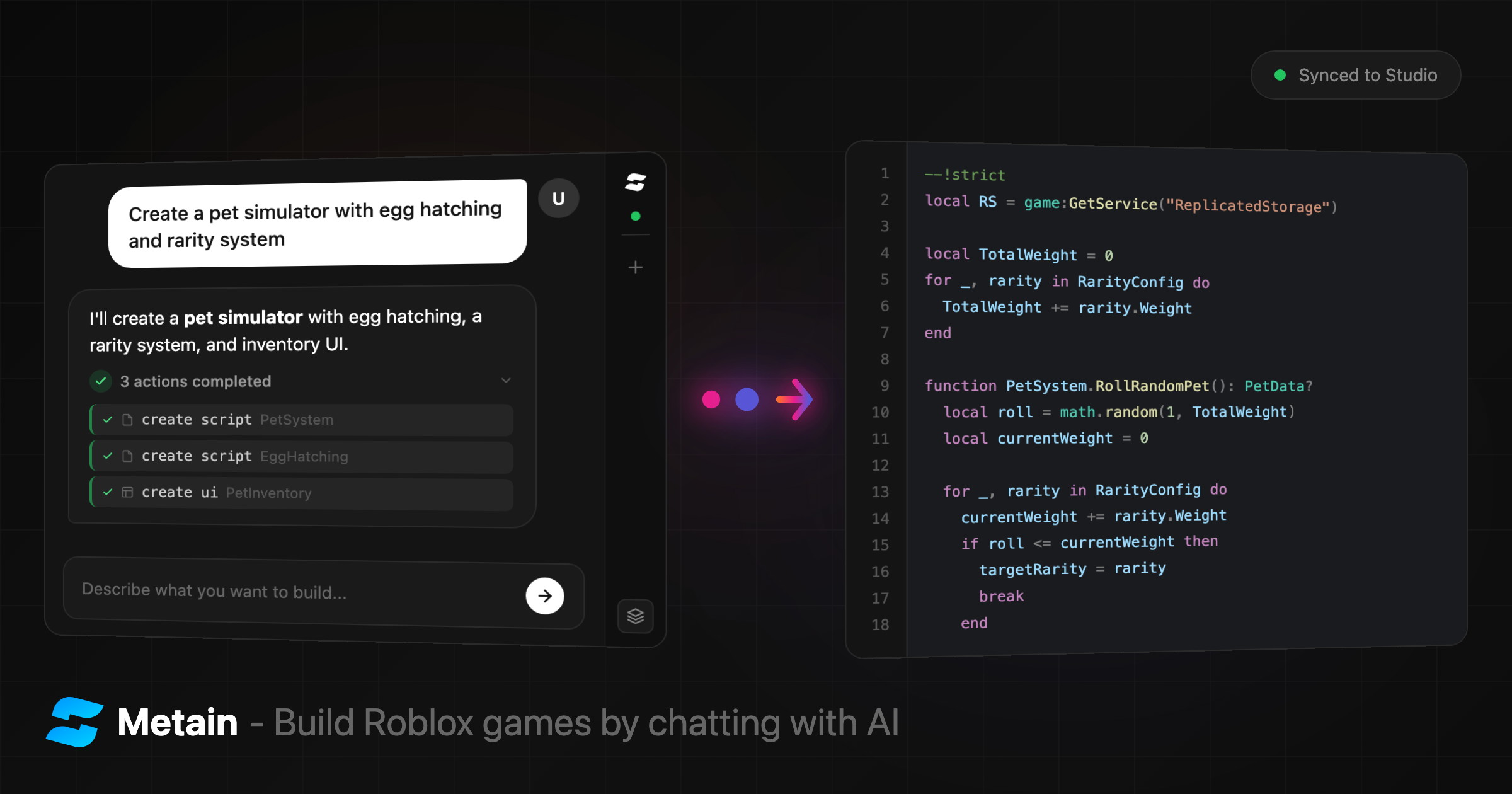
There's a new tool making waves in the Roblox development community and it's not what most developers expected. **Metain** is an AI agent that builds Roblox games from natural language prompts generating Luau scripts, creating UI and syncing everything directly to Roblox Studio in real-time.
After testing it firsthand, I can say it exceeded expectations. Here's the full breakdown.
[toc]
## What Is Metain?
[Metain](https://metain.dev) is a web-based AI platform purpose-built for Roblox game development. You type what you want in plain English *"Create a click-to-collect coin system with a leaderboard"* and the AI writes production-ready Luau code, creates instances, builds complete UI hierarchies and pushes everything into your Roblox Studio session live.
The key word there is **live**. This isn't a code generator that spits out text you paste manually. Changes appear in Studio the moment the AI writes them, synced over WebSocket in real-time.
## Why It Stands Out
Most AI coding tools are general-purpose. They generate Python, JavaScript or whatever you ask for, but they have no idea what Roblox Studio is, what Luau syntax looks like or how ScreenGuis are structured.
Metain is different because it was built specifically for Roblox:
- **Native Luau support** - not a general-purpose model awkwardly generating Roblox code
- **Context-aware** - before writing anything, the AI reads your entire game: hierarchy, scripts, UI, properties
- **Direct Studio integration** - the AI doesn't just generate code, it *executes* changes inside your Studio session
- **Scoped undo** - only reverses AI-made changes, leaving your manual work untouched
And here's what really matters: **as AI models improve, Metain automatically gets better.** The platform is powered by Claude, Anthropic's latest AI. Every model upgrade translates directly into smarter code generation, better game logic and fewer errors without users doing anything.
## No Downloads. No API Keys. No Extra Subscriptions.
This is where Metain separates itself from every other AI dev tool I've tested.
**The entire AI interface is a web chat.** You open [metain.dev/chat](https://metain.dev/chat) in your browser and start typing. That's it.
| Common complaint with AI tools | Metain's answer |
| :--- | :--- |
| "Do I need to install software?" | **No.** It's a website. Just open your browser. |
| "Do I need my own OpenAI/Anthropic API key?" | **No.** The AI is included. No API keys, ever. |
| "Do I need a separate AI subscription?" | **No.** Metain handles everything. One platform, one price. |
| "How does it connect to Roblox Studio?" | A free plugin from the Creator Store + a 6-digit code. |
The only thing you install is a lightweight Roblox Studio plugin from the official Creator Store and that takes about 30 seconds.
## How to Set It Up (Under 5 Minutes)
The setup process is surprisingly straightforward:
### Step 1: Sign In
Go to [metain.dev/auth](https://metain.dev/auth) and click **"Continue with Roblox."** You sign in with your existing Roblox account. No separate registration.
### Step 2: Install the Plugin
Grab the **Metain Connect** plugin from the Roblox Creator Store:
:point_right: [Install Plugin](https://create.roblox.com/store/asset/94668451190069)
It's free. Once installed, you'll see a **"Metain"** button in your Studio toolbar.
### Step 3: Connect
1. On [metain.dev/chat](https://metain.dev/chat), click **"Get Connection Code"**
2. A 6-character code appears (e.g., `A3K9X2`) with a countdown timer
3. Open Studio, click the Metain toolbar button to open the panel
4. Enter the code and click **Connect**
5. The status dot turns green you're connected
That's it. No configuration files, no environment variables, no terminal commands.
### Step 4: Start Building
Type a prompt like:
> *"Create a simulator game where players click a button to earn coins, with a shop GUI to buy upgrades and a leaderboard showing top players"*
The AI analyzes your game, writes the code, creates the instances and pushes everything into Studio. You watch it happen in real-time.
## What the AI Can Actually Do
This isn't a chatbot that gives you code snippets to copy-paste. The Metain AI agent executes **18 distinct commands** directly inside Roblox Studio:
### Scripts
- **Generate** new Scripts, LocalScripts and ModuleScripts with full source code
- **Read** existing scripts to understand your game before making changes
- **Rewrite** entire scripts or make **targeted edits** (find-and-replace, not just full rewrites)
### Instances & Objects
- **Create** any Roblox instance type with properties
- **Build complete UI** ScreenGuis, Frames, TextLabels, TextButtons, ImageLabels, ScrollingFrames, the works
- **Rename, move, clone and delete** any instance in your game
### Properties & Metadata
- **Set properties** on any instance (supports UDim2, Color3, Vector3, CFrame, Enum and more)
- **Manage tags** (CollectionService) and custom attributes
- **Undo** reverses only AI-made changes, preserving everything you built manually
### Context Awareness
Before generating anything, the AI reads your full game context:
- The complete hierarchy (ServerScriptService, ReplicatedStorage, StarterGui, etc.)
- Every script with its source code, path and status
- The full UI tree including layouts, colors, fonts and images
This means the AI doesn't work in a vacuum. It understands what you've already built and generates code that fits.
## Game Templates
For quick starts, Metain offers templates:
| Template | What You Get |
| :--- | :--- |
| **Simulator** | Clicking, collecting and upgrading mechanics |
| **Obby** | Obstacle courses and parkour systems |
| **Story** | Narrative-driven game structure |
| **Combat** | Fighting and PvP systems |
| **Tycoon** | Build-and-earn gameplay loops |
| **Social** | Hangout and roleplay setups |
| **Brainrot** | Meme games and chaos (yes, really) |
| **Custom** | Blank slate describe anything |
Select a template, finish the sentence and the AI builds it.
## Pricing
Metain uses a credit-based model. There's a free tier and credits never expire.
| Plan | Monthly | Credits/Month | Bonus on Packs |
| :--- | :--- | :--- | :--- |
| **Free** | $0 | — | — |
| **Metain+** | $4.99 | 12 | +10% |
| **Metain Pro** | $9.99 | 28 | +15% |
| **Metain Ultra** | $19.99 | 60 | +20% |
Annual billing saves 20% across all tiers.
**Credit packs** are also available as one-time purchases (no subscription needed):
| Pack | Credits | Price |
| :--- | :--- | :--- |
| Starter | 10 | $5 |
| Basic | 25 | $10 |
| Standard | 55 | $20 |
| Pro | 120 | $40 |
| Power | 300 | $90 |
First-time subscribers get **+50% bonus credits** on their first pack purchase.
Payments via Stripe (cards) and crypto via Cryptomus.
## Who Is This For?
Based on what I've seen, Metain fits a few distinct use cases:
- **Beginners** who want to build Roblox games but can't write Luau from scratch
- **Experienced developers** who want to prototype faster describe systems in English, refine the generated code
- **Solo developers** who need to move fast without hiring scripters
- **Content creators** who want to build game concepts quickly for videos or showcases
The AI handles the heavy lifting. You handle the creative direction.
## The Bottom Line
Metain is one of those tools that makes you wonder why it didn't exist sooner. The Roblox development ecosystem has been waiting for something like this a purpose-built AI agent that actually understands Studio, speaks Luau natively and doesn't require users to configure anything.
No downloads. No API keys. No extra AI subscription. Just open a browser, type what you want and watch it appear in Studio.
The fact that it's powered by Claude means it will only get better as AI improves. That's the kind of compounding advantage that's hard to ignore.
:point_right: **Try it:** [metain.dev](https://metain.dev)
:point_right: **Get the plugin:** [Roblox Creator Store](https://create.roblox.com/store/asset/77655523450717)
:point_right: **Join the community:** [Discord](https://discord.gg/npVzt2ZZ6S)
:point_right: **Follow updates:** [X / Twitter](https://x.com/metaindev)
---
*Published February 2026. Metain is an independent product and is not affiliated with Roblox Corporation.*
 Sign in via Facebook
 Sign in via X(Twitter)
 Sign in via GitHub
 Sign in via Dropbox
 Sign in with Wallet
Connect another wallet
Sign in with Wallet
Connect another wallet